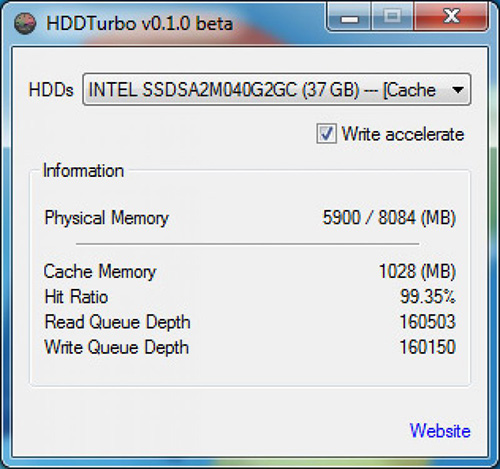
The HDDTurbo utility is a powerful tool designed to optimize computer performance by efficiently managing RAM and optimizing memory usage. This innovative software acts as a memory optimizer, ensuring that your computer operates at its full potential. It is a useful application you can rely on whenever you want to free the memory on your computer so its performance is considerably boosted.
Boost Your Computer's Performance with HDDTurbo Utility
Understanding the Importance of RAM and Its Impact on Computer Performance
Understanding the importance of RAM and its impact on computer performance is crucial. RAM, or Random Access Memory, plays a vital role in determining how efficiently our computers operate.
One way to optimize RAM and enhance computer performance is through the use of HDDTurbo utility. This powerful tool allows users to free up RAM by intelligently managing memory allocation. By doing so, it helps increase the speed and responsiveness of our computers.
By optimizing RAM usage, we can ensure that our systems are running at their peak performance levels. This not only improves overall productivity but also enhances user experience by reducing lag times and minimizing system crashes.
In this section, we will delve deeper into the significance of RAM in computer performance and explore how utilizing tools like HDDTurbo can help us maximize our system's capabilities. So let's embark on this journey to unlock the true potential of our computers by harnessing the power of RAM optimization.
What is HDDTurbo Utility and How Does it Work?
The HDDTurbo utility is a powerful tool designed to optimize computer performance by efficiently managing RAM and optimizing memory usage. This innovative software acts as a memory optimizer, ensuring that your computer operates at its full potential.
So, how does HDDTurbo work? This utility intelligently analyzes the RAM usage on your computer and identifies any unnecessary or idle processes that may be consuming valuable memory resources. It then reallocates this memory to active processes, resulting in a significant boost in overall system performance.
HDDTurbo is a user-friendly software utility that you can install on your PC if you want to free up the RAM of your PC. Once you have installed HDDTurbo, the hard disk read and write operations will be faster thus increasing the overall performance of the computer.
By effectively managing RAM, HDDTurbo ensures that your computer runs smoothly even when dealing with resource-intensive tasks such as gaming, multimedia editing, or running multiple applications simultaneously. It eliminates lagging and slowdowns by optimizing memory allocation and reducing the strain on your system's resources.
Not only does HDDTurbo enhance the performance of your computer, but it also helps extend the lifespan of your hardware components. By reducing unnecessary disk access and minimizing data swapping between hard drives and RAM, it reduces wear and tear on your hard drive while improving overall system stability.
In summary, HDDTurbo is an essential tool for anyone looking to maximize their computer's performance. With its intelligent RAM management capabilities and memory optimization techniques, it ensures smooth operation even during demanding tasks. Say goodbye to sluggishness and hello to a faster, more efficient computing experience with HDDTurbo utility.
The Benefits of Using HDDTurbo Utility to Free Up RAM
If you're looking to optimize your computer's performance and enhance your multitasking capabilities, using the HDDTurbo utility is a game-changer. With its impressive benefits, this tool can free up RAM and reduce lag time, ultimately improving your overall computing experience.
One of the key advantages of using the HDDTurbo utility is its ability to optimize computer memory. By freeing up RAM, it allows your computer to allocate resources more efficiently, resulting in faster processing speeds and smoother performance. Whether you're running multiple applications simultaneously or working on resource-intensive tasks, this optimization can significantly enhance your productivity.
Another significant benefit of utilizing the HDDTurbo utility is its impact on multitasking capabilities. With increased available RAM, you can seamlessly switch between various programs without experiencing slowdowns or delays. This means you can effortlessly work on multiple projects at once or enjoy smooth gaming sessions without compromising performance.
Furthermore, reducing lag time is a crucial advantage that comes with using HDDTurbo. Lag can be frustrating and hinder productivity or enjoyment when using resource-demanding applications or playing graphics-intensive games. By freeing up RAM and optimizing memory usage, this utility minimizes lag time and ensures a seamless computing experience for users.
If you want to unlock the full potential of your computer's performance, the benefits offered by the HDDTurbo utility are undeniable. From optimizing memory usage to improving multitasking capabilities and reducing lag time, this tool provides an efficient solution for those seeking enhanced computing experiences.
Step-by-Step Guide: How to Use HDDTurbo Utility to Free Up RAM
In this step-by-step guide, we will walk you through the process of using the HDDTurbo utility to free up your RAM and optimize your computer's performance.
First, let's start with the setup process. Begin by visiting the official website of HDDTurbo and locate the download link for the utility. Once downloaded, follow the on-screen instructions to complete the installation process. Make sure to choose a destination folder where you want to install HDDTurbo.
After installing HDDTurbo, it's time to configure your RAM settings. Launch the utility and navigate to the settings menu. Here, you will find various options related to RAM optimization. Take some time to familiarize yourself with these options as they will determine how HDDTurbo manages your computer's memory.
Next, it's important to set up automatic optimization. This feature allows HDDTurbo to continuously monitor your system's memory usage and automatically free up RAM when needed. Enable this option in the settings menu and adjust any additional parameters according to your preferences.
Now that everything is set up, it's time to put HDDTurbo into action. Simply click on the "Optimize" button or use any keyboard shortcut assigned by default. HDDTurbo will instantly start freeing up RAM by closing unnecessary background processes and allocating more memory for active applications.
Remember that regular maintenance is key for optimal performance. Consider scheduling periodic scans with HDDTurbo or manually optimizing your RAM whenever you notice a decrease in system speed.
Using HDDTurbo utility can significantly improve your computer's performance by freeing up RAM and optimizing memory usage. By following this step-by-step guide, you can easily set up and configure this powerful tool for maximum efficiency in no time at all!
Maximizing the Performance Gains with Additional Tips and Tricks
To truly maximize performance gains, it's important to go beyond the basics and explore additional tips and tricks. By implementing these strategies, you can ensure that your system runs smoothly and efficiently.
One of the key areas to focus on is optimizing RAM usage. RAM plays a crucial role in determining how quickly your computer can access and process data. To make the most out of your system's RAM, consider closing unnecessary background applications. These applications consume valuable resources and can slow down your computer's performance. By closing them, you free up memory for more important tasks.
Another tip for enhancing performance is managing startup programs. When you start up your computer, numerous programs may automatically launch in the background. This can significantly impact boot time and overall system speed. Take control of your startup programs by disabling any unnecessary ones from launching at startup. This way, you'll have a faster boot time and more resources available for other applications.
By incorporating these additional tips and tricks into your routine, you can optimize your system's performance to its fullest potential. Enjoy a smoother computing experience with improved efficiency and responsiveness
HDDTurbo runs on
Windows 10/11
and is available under the
Freeware
license
— the installer is 106 KB.
We’ve catalogued it under
System.
Help fellow users decide. Share your experience with HDDTurbo.