Binary Adder/Subtractor : A Java-based application that displays a graphical representation of a four-bit adder / sub-tractor and helps you understand the logic of the circuit
Binary Adder/Subtractor provides you with a demonstration of how a four-bit adder / subtractor works. Binary Adder/Subtractor enables you to understand the way an existing adder is re-used for replacing a subtraction operation, without having to create a new circuit.
Binary Adder/Subtractor (4 bit) Circuit Description
A four-bit adder/subtractor demonstration. While it is perfectly possible to design a custom circuit for the subtraction operation, it is much more common to re-use an existing adder and to replace a subtraction by a two-complement's addition.
The applet shows how this is done. Click the input switches or type the 's' bindkey to control the Sub/nAdd switch, and '1' .. '8' to control the A and B inputs.
When the Sub/nAdd input is low (0), the XOR-gates act as non-inverting buffers, and the carry-input to the adder is 0. Therefore, the adder calculates a four-bit sum plus carry-out:
(Cout,S3,S2,S1,S0) = (A3,A2,A1,A0) + (B3,B2,B1,B0)
If the Sub/nAdd input is high (1), the XOR-gates act as inverting buffers, and the carry-input to the adder is 1.
(Cout,S3,S2,S1,S0) = (A3,A2,A1,A0) - (B3,B2,B1,B0)
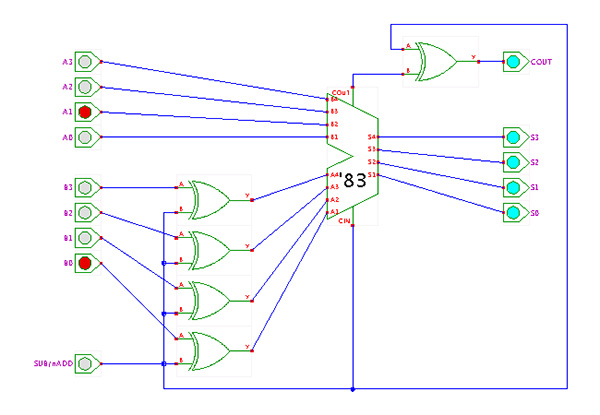
The Subtraction micro-operation can be done easily by taking the 2's compliment of addend bits and adding it to the augend bits.
The 2's compliment can be obtained by taking the 1's compliment and adding one to the least significant pair of bits. The 1's compliment can be implemented with inverters, and one can be added to the sum through the input carry.
The Arithmetic micro-operations like addition and subtraction can be combined into one common circuit by including an exclusive-OR gate with each full adder.
The block diagram for a 4-bit adder-subtractor circuit above can be represented as:
Binary Adder-Subtractor
When the mode input (M) is at a low logic, i.e. '0', the circuit act as an adder and when the mode input is at a high logic, i.e. '1', the circuit act as a subtractor.
The exclusive-OR gate connected in series receives input M and one of the inputs B.
When M is at a low logic, we have B? 0 = B.
The full-adders receive the value of B, the input carry is 0, and the circuit performs A plus B.
When M is at a high logic, we have B? 1 = B' and C0 = 1.
The B inputs are complemented, and a 1 is added through the input carry. The circuit performs the operation A plus the 2's complement of B.
Frequently asked questions
What is Hades?
Hades is a framework for interactive discrete-event and
object-oriented simulation written in Java.
It consists of:
- a simulation engine (actually several different simulators).
- an interactive graphical editor.
- tools for visualization (e.g. glow-mode).
- a library of simulation components
(e.g. digital logic gates, flipflops, memories, microprocessors).
- a library and design browser.
- a waveform viewer to trace signals.
- a Jython scripting interface.
The main feature of the Hades editor is
interactive simulation:
the current circuit system can be edited even while a simulation is running.
There is no need for the traditional and tedious
edit-compile-simulate-analyze cycle.
The name "Hades" stands for "Hamburg Design System",
but also indicates that some of our computer science students
don't really like having to learn about digital systems -
Hades is meant to help them.
Which version of Hades do I have, which version do I need?
The Hades applet will not display version information,
because the correct version of the software will automatically
be downloaded by your (Java-enabled) browser.
Basically, the web-designer is responsible for ensuring that the
required version of the editor and simulator are used for the applets.
If you are running Hades as a standalone application,
the version number will be displayed in the window title.
Or select the "About" menu item in the "Help" menu
to open a dialog window with version information.
Select the "Changes" menu item to see a list of recent changes to Hades;
you can also look at the hades/doc/CHANGES text file
contained in your hades.jar archive with your favorite Zip-archive packer.
The applet won't start
Given a recent Java plug-in, the applets should work in all
current web-browsers on all current desktop operating systems,
including Windows, Linux, and Mac OS X.
We recommend to use the most recent version of JDK/JRE (or OpenJDK)
for your platform and browser.
For historical value,
the following table summarizes our experiences of common browsers
and Java virtual machines around 2007:
| Operating system | Browser | Java | Status |
| Windows 98 | Netscape 4.7 | built-in | broken |
| Windows 98 | Mozilla 1.7 | JDK 1.4.2 | ok |
| Windows XP | Mozilla 1.7 | JDK 1.4.2 | ok |
| Windows XP | Mozilla 1.7 | JDK 1.5.0 | ok |
| Windows XP | Internet Explorer | JDK 1.4.2 | ok |
| Windows XP | Internet Explorer | JDK 1.5.0 | ok |
| Mac 10.3 | Safari | JDK 1.4.2 | ok |
| Mac 10.4 | Safari | JDK 1.4.2 | ok |
| Linux 2.4.x | Mozilla 1.7 | JDK 1.4.2 | ok |
| Linux 2.4.x | Mozilla 1.7 | JDK 1.5.0 | ok |
| Linux 2.6.x | Mozilla 1.7 | JDK 1.4.2 | ok |
| Linux 2.6.x | Konqueror 3.x | JDK 1.4.2 | broken |
Also, please remember that your browser has to download
the whole applet software before starting the applets.
As the complete hades.jar archive file is about
5 MBytes, the downloading itself can take a while even
on fast internet connections.
A typical first-time startup time on a fast DSL modem lime
(1000 kbps) is 20..30 seconds.
Afterwards, the browser caches the applet software archive,
and individual pages should load in a few seconds.
You will need quite some patience when trying to access the applet demos
over a slow internet connection like an analog modem line:
5 MBytes at a typical rate of about 40 kbps (or 4 KB/s)
implies an initial download time of about 1250 seconds (or 20 minutes).
After that, most individual applets will load in a few (up to ten) seconds,
but a few applets (e.g. the carry lookahead adders) are based on dozens
of subcomponents with correspondingly longer download times.
The first applet worked, but the next applets won't
So far, we have only seen this behaviour with the KDE konqueror browser,
but with all Java versions (JDK 1.4.x and JDK 1.5.x).
For unknown reasons, the KJAVA/KJAS server process is started for each
new applet, but it doesn't do anything.
You might have to restart konqueror for each new applet, or run
the webstart version of the applets.
Given that the only konqueror help docs still refer to JDK 1.2.2,
Java support obviously isn't a high priority for the konqueror developers.
I just downloaded the Hades archive, but it won't run!
To run Hades as a standalone application, you need the following:
- the hades.jar archive file with the Hades software,
- a suitable Java virtual machine.
Please make sure that you download the
hades.jar
archive file in binary transfer mode.
In Internet Explorer or Firefox/Mozilla, use a right-button click to bring up
the context menu and then select 'save link target as' (or equivalent).
In theory, Hades should run with any Java 2 compatible
Java virtual machine.
When using the AWT-mode, the editor and many simulation components
may even be used with an old Java 1.1-generation virtual machine,
but such setup is no longer supported.
In practice, you should use JDK/JRE (Java development kit, Java runtime
environment) version 1.4.2 or J2SE 5.0 (a.k.a. Java 1.5.0) or later.
To run the editor, open a shell and type the following command:
java -Xmx256M -jar hades.jar
This assumes that the shell knows how to find the
java
executabe and that the
hades.jar is in the current
directory. If necessary, specify absolute path names in the command.
The
-Xmx256M switch tells the Java virtual machine to
increase the memory limit to 256 MBytes
instead of its internal default value (often a meagre 64 MBytes
or even less).
Can I use the Java Runtime Environment (JRE) instead of the JDK?
Yes, no problem.
Can I run Hades as an applet inside a WWW-Browser?
Yes. This should work with most Java-enabled web-browsers,
with JDK/JRE 1.4.2 or higher recommended as the Java virtual machine.
However, note that the applet version is mainly intended to allow
easy access to pre-defined example circuits.
As such, most edit functions are disabled in the applet version.
I cannot open files!
This can only happen if you are running Hades as an applet inside
your web-browser.
You need to change the Java security settings and restart your browser.
No sound!
In general, audio (both sampled and MIDI) should work on current
Java virtual machines like JDK 1.4 or higher
on all supported platforms including Windows, Linux, OS X, etc.
However, audio output is used by very few applets on this website,
namely the FreeTTS-based text-to-speech functions.
If audio output does not work on your system, please check the following:
- when running the Hades applets inside your browser,
please ensure that you granted the required AudioPermission,
see the next paragraph.
- check that audio functions are enabled by your operating system.
- check volume controls and speaker/headphone cables.
- on Linux, stop all other programs that play audio (e.g. mp3 playback),
then restart the Hades application or your browser (Hades applet).
On many Linux systems, several incompatbile drivers (e.g. alsa/oss/artsd)
are installed, and a running application will often access the sound
device directly instead of accessing it via a mixer device.
In such cases, other applications are denied access to the sound device.
The default configuration of the Java virtual machine denies applets any
audio output, to prohibit malign applets from bothering the user.
Therefore, you will have to add an explicit "AudioPermission" entry
to your Java security control file (.java.policy) in order to get
audio including the text-to-speech functions working.
The applet worked, but the Webstart version don't
Sorry, you've hit a known bug here.
The applet version of Hades uses a slightly different algorithm
to look for subdesign files than the standalone application and
webstart versions.
As a result, the application version will sometimes fail to find
nested subdesign files referenced by the webdemos design files.
What are those funny colors?
The Hades editor uses colors to indicate the current logical value
for each signal during the simulation.
This is called 'glow-mode' and can be switched on and off via the
popup-menu (in the applet) or the layers-menu (editor).
The actual mapping from logical value to colors depends on the
signal type and the settings in your Hades configuration files.
In the default configuration of the applets,
the following colors are used for the five most important states:
| |
|
|
0 - logical zero (low voltage, VSS) |
| |
|
|
1 - logical one (high voltage, VDD) |
| |
|
|
Z - tri-state (signal not driven) |
| |
|
|
U - undefined (not initialized) |
| |
|
|
X - invalid or unknown (e.g. short-circuit) |
The simulation is slow!
It shouldn't be.
The simulation speed should be more than adequate for most of
the circuits found in typical classroom examples and exercises
and all the demonstration circuits on our website.
Note that the simulation is deliberately slowed-down in
real-time simulation mode
(the default), to allow the observation of gate-delay effects.
On modern PCs or workstations with a recent Java virtual machine,
the Hades simulator will usually run at about one million
simulation events per second.
(This isn't so much slower than some discrete-event based
commercial simulators for digital circuits, e.g. some versions
of Synopsys VSS.
Note that Hades can do fewer optimizations and has to do many more
runtime checks,
because it allows editing and modifying the circuit as runtime.)
Also, Hades should be able to run at 10 ... 50 screen redraws
(or frames/second) in interactive simulation.
However, redrawing the screen often takes much more time than
the simulation itself, especially when glow-mode is activated
or the circuit contains many interactive components like LEDs.
I cannot print!
Whether you can print the applet pages depends on your Java virtual
machine and web-browser.
Quite a few browsers simply ignore Java applets during printing;
but even if your web-browser supports printing, the output quality
may be low.
This is a known bug that hampers all Java applets,
and there is little we can do about it.
I hate those tooltips!
Open the popup-menu and select
view - toggle tooltips
to enable or disable the tooltips.
Or click the mouse inside the schematics area (to ensure that
the Hades applet has the keyboard focus) and type
cntl+t to switch the tooltips on or off.
The applet crashed!
Unfortunately, this can happen, especially when you quickly
browse through multiple applets.
Even more unfortunately, these failures seem to be related
to the Java virtual machine itself and are hard to reproduce.
Please don't hesitate to report your experiences and provide
detailed bug reports or troubleshooting tips.
One failure scenario occurs when quickly browsing through the
list of applets. Each time you visit a new applet page, the
previous applet has to be stopped and destroyed by the Java
virtual machine. However, in order to start the new applet
as quickly as possible, all current Java plugins first start
the new applet before they begin to clean-up the previous applet(s).
If you request too many applets to quickly, the Java pluging doesn't
manage to clean up at all, and runs out of resources.
The details are highly system dependent, but the usual outcome
is that the Java virtual machine starts to consume 100% of CPU time
without doing any useful work.
In some cases, you may even have to kill the Java virtual machine
via the task manager (just restarting the browser won't always help
in this situation, because the virtual machine is busy with itself).
Also, the Java plugin somehow seems to leak about 300 KBytes
of memory per invocation of the Hades applet (at least on Unix/Linux
systems.)
This really should not happen, because all applet resources are
claimed to be destroyed when you leave the applet webpage.
While 300 KBytes doesn't sound much, the lost memory sums up
pretty quickly when you visit a lot of applets.
Remember that the default memory limit for the whole Java plugin
is only 64 Mbytes.
Browsing through all Hades demonstration applets alone might
eat up all available memory,
unless you increase the memory limit via the Java plugin control panel.
Binary Adder/Subtractor runs on
Windows 10/11
and is available under the
Freeware
license
— the installer is 9.0 MB.
We’ve catalogued it under
Science and Engineering.
Help fellow users decide. Share your experience with Binary Adder/Subtractor.
