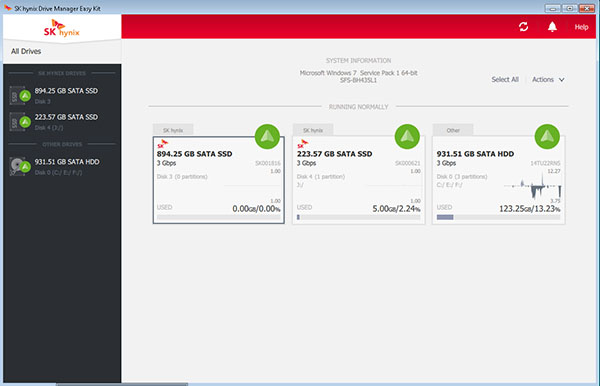
SK hynix Drive Manager Easy Kit is a lightweight utility for the management and maintenance of your SSD drives that also acts as a system information tool for your SSD
SSDs are the latest trend when discussing data storage on the PC. They have superior reading and writing speeds compared to traditional HDDs. They are also lighter, more power efficient and less noisy, making them the ideal replacement for an HDD, if it weren't for their smaller storage capacity.
SK hynix Drive Manager Easy Kit is a utility designed for monitoring, administrating, and managing local SSD drives. It can enumerate SK hynix and other system drives, drive details, detailed information on the drive's health. It also run diagnostic tests, update SSD firmware, erase drive, etc.
Despite the overwhelming amount of pros, an SSD is but an HDD with a few extra steps, making them susceptible to wear and tear over time as well.
This application is used to maintain SK hynix SSDs. It serves for example to identify the SSD model and capacity and to obtain information about it state of health, temperature and other attributes. The application also allows you to reset an encrypted SSD (Revert PSID).
Main Features
– Drive details such as capacity, model, etc.
– Identification and enumeration of SK hynix and other system drives
– Detailed information on drive health
– Run a diagnostics test
– Update SSD firmware
– Drive erase options
– Drive Diagnostics
– Revert PSID
– Backup your SK hynix SSD prior to the firmware update.
Drives Window
The All Drives window contains information on the system and displays all available drives dividing them into those that need attention or run normally. The System Information area shows information on the system. The Drives List area lists all available drives. SK hynix drives are listed first followed by all other drives. Noite: Do not disconnect your SSD or shut down the power while the firmware update is in progress. Ignoring this precaution may result in data corruption or even SSD damage.
Drive Area
Drive Area displays information on drive type, serial number, capacity, used space, and partitions.
When you select a drive, the Drive Area gets highlighted.
Real Time Performance can also be displayed in the Drive Areas of the All Drives window.
Notifications
The Notifications indicator displays the number of notifications per session. To remove a notification, select the notification checkbox, and then click Remove Selected. To save notifications Select the notifications checkbox then Click Save Selected button. When the dialog appears, choose the folder where notifications will be saved. You can also select the notification message in the Notifications dialog, and then copy and paste it.
Drive Information
When a drive is selected, the Drive Information window will appear.
The window displays information on drive type, capacity, and firmware.
The Update Firmware and Erase Drive buttons are also available in this window.
If a drive supports PSID, then the Revert PSID button will also be available in the Drive Information window.
To reload the data displayed on a drive, click the Refresh button.
Switch between the following tabs to get more information:Summary, SMART, Settings, Details and Diagnostics
Summary Tab
The Summary section shows information on the remaining free space (both in GBs and percentage) as well as drive capacity and partitions for all SATA drives. Information on temperature, life remaining, and drive status is shown for SK hynix drives only.
Supported Mpdel
Canvas SC300 2.5" 128 GB (HFS128G32MND-3312A)
Canvas SC300 2.5" 256 GB (HFS256G32MND-3312A)
Canvas SC300 2.5" 512 GB (HFS512G32MND-3312A)
Canvas SC300 M.2 128 GB (HFS128G39MND-3510A)
Canvas SC300 M.2 256 GB (HFS256G39MND-3510A)
Canvas SC300 M.2 512 GB (HFS512G39MND-3510A)
Canvas SC300 mSATA 128 GB (HFS128G3AMND-3310A)
Canvas SC300 mSATA 256 GB (HFS256G3AMND-3310A)
Canvas SC300 mSATA 512 GB (HFS512G3AMND-3310A)
Canvas SC300A 2.5" 128 GB (HFS128G32MND-3210A)
Canvas SC300A 2.5" 256 GB (HFS256G32MND-3210A)
Canvas SC300A 2.5" 512 GB (HFS512G32MND-3210A)
Canvas SC305 128 GB (HFS128G32MNC-3210A)
Canvas SL301 250 GB (HFS250G32TND-3112A)
Canvas SL301 500 GB (HFS500G32TND-3112A)
Canvas SL308 120 GB (HFS120G32TND-N1A2A)
Canvas SL308 250 GB (HFS250G32TND-N1A2A)
Canvas SL308 500 GB (HFS500G32TND-N1A2A)
PC300 960GB (HFS960GD0MEE-5410A)
PC305 128GB (HFS128GD9MND-5510A)
PC305 256GB (HFS256GD9MND-5510A)
PC305 512 GB (HFS512GD9MND-5510A)
PC305 1TB (HFS001TD8MND-5510A)
SC210 2.5" 128 GB (HFS128G32MND-2200A)
SC210 2.5" 256 GB (HFS256G32MND-2200A)
SC210 mSATA 128 GB (HFS128G3AMND-2200A)
SC210 mSATA 256 GB (HFS256G3AMND-2200A)
SH910 256GB (HFS256G32MNB-2202A)
SH910 512GB (HFS512G32MNB-2202A)
SH910A 64GB (HFS064G32MNB-2201A)
SH910A 128GB (HFS128G32MNB-2201A)
SH910A 256GB (HFS256G32MNB-2201A)
SH910A 512GB (HFS512G32MNB-2201A)
SH920 2.5" 64GB (HFS064G32MNB-2200A)
SH920 2.5" 128GB (HFS128G32MNB-2200A)
SH920 2.5" 256GB (HFS256G32MNB-2200A)
SH920 2.5" 512GB (HFS512G32MNB-2200A)
SH920 mSATA 64 GB (HFS064G3AMNB-2200A)
SH920 128GB mSATA (HFS128G3AMNB-2200A)
SH920 mSATA 256 GB (HFS256G3AMNB-2200A)
SH920 mSATA 512 GB (HFS512G3AMNB-2200A)
Windows 10 64 bit / Windows 10 / Windows 8 64 bit / Windows 8 / Windows 7 64 bit / Windows 7
SK hynix Drive Manager Easy Kit runs on
Windows 10/11
and is available under the
Freeware
license
— the installer is 59.7 MB.
We’ve catalogued it under
System.
Help fellow users decide. Share your experience with SK hynix Drive Manager Easy Kit.