Excel Convert Column To Table and Table To Column Software7.0
Excel Convert Column To Table and Table To Column Software - A simple to use Microsoft Excel tool that enables you to easily convert the data from a column into a table, in a newly created sheet
What is Excel Convert Column To Table and Table To Column Software?
Excel Convert Column To Table and Table To Column Software - A simple to use Microsoft Excel tool that enables you to easily convert the data from a column into a table, in a newly created sheet
In depth
A closer look at Excel Convert Column To Table and Table To Column Software
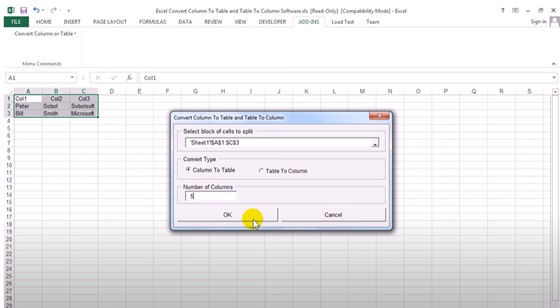
Excel Convert Column To Table and Table To Column Software Excel Convert Column To Table and Table To Column Software comes as a Microsoft Excel workbook, with the specific macros and prompts you to enable the use of these tools in your software. The add-in is supported by Microsoft Excel from 2000 edition up to 2013 and it can easily integrate in the command ribbon. You can simply import the data you wish to manipulate into this workbook, then convert the column or tables.
You can either select the cells containing the desired information, or just enable the converter and select which type of process you wish the add-in to perform. You can either convert a column into a table or a table into columns. The bar at the top of the configuration window allows you to specify the block of cells you wish to split.
Other Excel Tools
ExcelTrick offers a variety of resources to help users improve their Excel skills. From beginner-friendly tutorials to advanced formulas and VBA guides, this site offers a wealth of information to help you work more efficiently and effectively.
Requirements
System requirements
Windows 10 64-bit / Windows 10 / Windows 2003 / Windows 8 64-bit / Windows 8 / Windows 7 64-bit / Windows 7 / Windows Vista 64-bit / Windows Vista / Windows XP / Windows 2000
Verdict
Should you download Excel Convert Column To Table and Table To Column Software?
Excel Convert Column To Table and Table To Column Software runs on
Windows 10/11
and is available under the
Demo
license
— the installer is 2.4 MB.
We’ve catalogued it under
Word Processing.
✓
Verified clean. Every Excel Convert Column To Table and Table To Column Software build on SoftLookup is scanned for viruses, spyware, adware, trojans and backdoors. We re-test on every update.
Sponsored
At a glance
Excel Convert Column To Table and Table To Column Software specifications
Windows 10 64-bit / Windows 10 / Windows 2003 / Windows 8 64-bit / Windows 8 / Windows 7 64-bit / Windows 7 / Windows Vista 64-bit / Windows Vista / Windows XP / Windows 2000
License
Demo
Operating system
Windows 10/11
File size
2.4 MB
Price
Free
Page views
673
Leave a comment
Help fellow users decide. Share your experience with Excel Convert Column To Table and Table To Column Software.