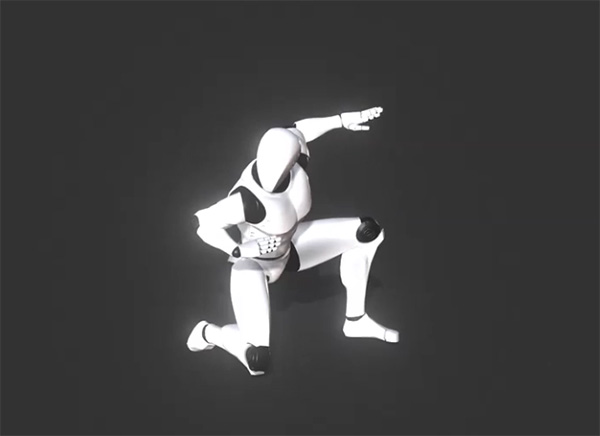
iclone motion pack free download, Kung-Fu iMotion files including punching, kicking.
The motions are suitable to be used in a fighting film or a Kung-Fu demonstration video. with the variety of Kung-Fu fighting motions including ( punching, kicking and elbowing as well as combo Kung Fu fighting) in iClone format: .iMotion
check also:
Action Motion Pack for iClone and
iClone Communication MixMoves Body Motions
Converting a Human Motion to an iClone iMotion
Although there are plenty of human motions embedded in iClone, you may sometimes need to apply
motions from other 3D motion generators. To do this, you first need to convert the motions via 3DXchange
before using them in iClone. After the conversion, the motions can be applied to every
standard or non-standard human character in iClone.
|
Supported File Format
|
.BVH
.FBX (with human motions)
|
Step 1: Preparing Motions and Entering Characterization Mode
-
Press Ctrl + N to open a new project.
-
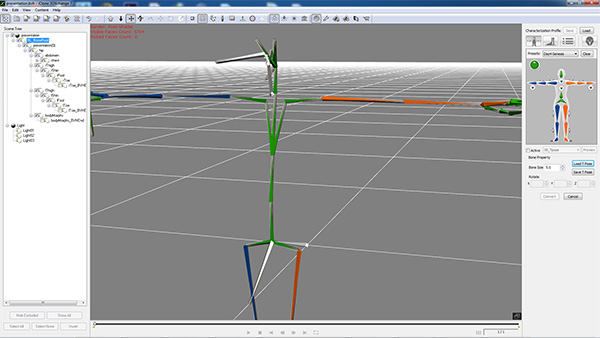
Load a character motion file in the formats described above by drag-and-dropping the file directly into the 3D viewer. If the file contains no character mesh, then
3DXchange will apply a stick character for observation.
-
Adjust the X, Y, Z values in the Transform section so that the
motion will be relocated to the center of the world. Please not that you Must Not use the Align to Ground,
Align to Center or Reset Transform button to change the position of the motion.
-
Go to the Character section of the Modify panel.
Click the Convert to Non-Standard button to enter the
Characterization mode.
The Modify page will instantly change to characterization mode.
Step 2: Setting a T-Pose
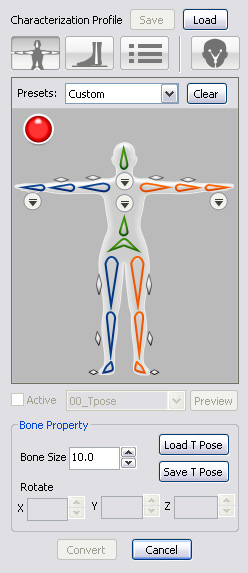
Because all iClone motions (*.iMotion) are based on a T-Pose, then you must
adjust the motion's pose to a T-Pose so that you will not encounter any offset issues in
the body parts once you apply these motions.
Motions from Standard Bone-rigging 3D Tools
-
If you know the 3D source tools from where you get your motions, then you
only need to select a prepared profile with a completed T-pose for the motion.
Motions from Custom Bone-rigging 3D Tools
-
If the motion does not start with a T Pose, then you need to
manually adjust the angle of
each bone by using the controls in the Bone Property section. For more information about
setting a T-pose, please refer to the
Manually Setting T-Pose section.
Step 3: Mapping Motion Bones to Reallusion Human Bones
Converting a custom motion to an iMotion in 3DXchange is actually
mapping the custom bones to the standard bones so that when the motion is
applied, the character is triggered to act by the standard bones to which
the motion is actually applied.
Motions from Standard Bone-rigging 3D Tools
-
If you know the 3D source tools from where your motions were created, then you
only need to select a prepared profile with completed mapping results to
auto-map the motion bones.
Motions from Custom Bone-rigging 3D Tools
-
In the Bone Mapping tab, manually map at least 15 basic bones of the Standard Character Bones to the corresponding bones
of the loaded motion.
(The dummy image of the bone structure on the right side of the application is the RL Bone - Reallusion Bone Structure).
|
Note:
|
-
When you load a motion file which only contains bone relation without mesh data;
in order to show the character structure, 3DXchange adds in
mesh nodes with a suffix name _AutoMesh as visual dummies to
represent the character.
-
Please note that you must always map the bones instead of the mesh nodes with suffix name _AutoMesh
to prevent incorrect mapping results.
|
Step 4: Fine-Tuning Motions
-
After finishing with the mapping, enable the Active checkbox so that the
motion bone structure is governed under the
RL Bone.
-
Click the Convert button to exit the Convert to Non-Standard mode.
-
Go to the Animation section, select the motion in the Motion Library section.
-
Click the Apply to iClone button to apply the selected motion and preview the
motion results.
-
If the character shows some motion flaws, such as shrugged shoulders, then you need to adjust the T-pose in 3DXchange.
|
The motion shrugs the character's shoulders in iClone.
|
Rotate the collar bones to align to the motion.
|
The shoulders are rectified.
|
-
Repeat the steps until the motion results appear to be correct.
Step 5: Saving Characterization Profile and Export
-
If you are satisfied with the motion results, then enter the Characterization mode and
save the settings as a Characterization Profile to reuse later.
-
Leave the characterization mode and click the Add to Perform button to add this motion to the Perform Editor.
-
Export the mapped motion to use inside iClone as a
Standard Character Motion.
-
Export with Geometry and Animation boxes activated:
|
The stick man built up with auto meshes will also be exported as a non-standard character.
|
The motion is put into the Custom Motion library under a folder with the same name.
|
-
Export with only the Animation box activated: Only the motion will be exported.
iclone motion pack free download: Kung-Fu Motion for Martial Art runs on
Windows 10/11
and is available under the
Freeware
license
— the installer is 1000 KB.
We’ve catalogued it under
Graphics Editing and Painting.
✓
Verified clean. Every iclone motion pack free download: Kung-Fu Motion for Martial Art build on SoftLookup is scanned for viruses, spyware, adware, trojans and backdoors. We re-test on every update.
Help fellow users decide. Share your experience with iclone motion pack free download: Kung-Fu Motion for Martial Art.