Overview
What is PopScan?
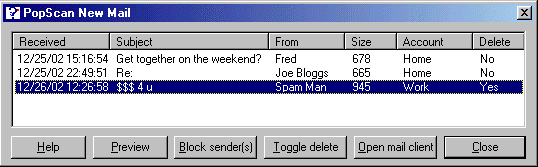
A small, easy to use e-mail checker with spam detection (including heuristical matching), mail preview feature, dial-up support and lots of options. You are notified of new mail through the system tray icon, and your choice of messages and sounds.
In depth
A closer look at PopScan
PopScan is an efficient little shareware app that will check for new e-mail waiting to be collected from your POP3 mailboxes. Features include: Install and uninstall support; Evaluation version fully functional; Checks multiple mailboxes; Small footprint; Spam filter with heuristical spam detection; Highly customisable; Supports multiple users on one PC; Runs as a system tray utility; Windows 95/98/NT/2000/ME/XP; Online Registration
Verdict
Should you download PopScan?
PopScan runs on
Windows 95/98/Me/NT/2000/Windows 10/11
and is available under the
30-day Trial
license
— the installer is 237 KB.
We’ve catalogued it under
Notification Utilities.
✓
Verified clean. Every PopScan build on SoftLookup is scanned for viruses, spyware, adware, trojans and backdoors. We re-test on every update.
Sponsored
At a glance
PopScan specifications
- Last updated
- Mar 10, 2025
- License
- 30-day Trial
- Operating system
- Windows 95/98/Me/NT/2000/Windows 10/11
- File size
- 237 KB
- Price
- $10
- Page views
- 416
Help fellow users decide. Share your experience with PopScan.