Overview
What is Mesh Unfolder Demo?
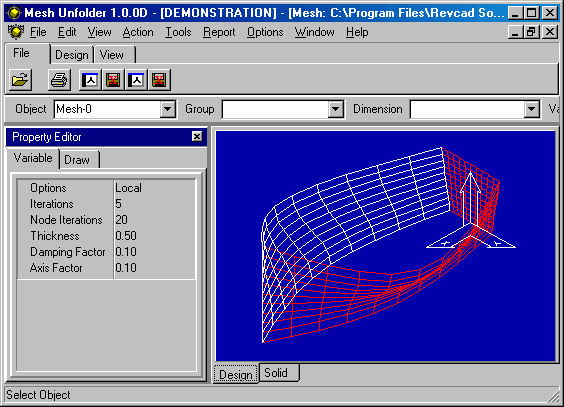
Mesh Unfolder is a specialised engineering 3D CAD system for importing and unfolding sheet metal mesh designs for fabrication or manufacture. Meshes are imported from dxf files created in a CAD system such as Autocad.
In depth
A closer look at Mesh Unfolder Demo
Mesh Unfolder is a specialised engineering 3D CAD system for importing and unfolding sheet metal mesh designs for fabrication or manufacture. Meshes are imported from dxf files created in a CAD system such as Autocad. These meshes are imported via dxf files and unfolded (i.e. flattened) to produce the best result flat 2D representation. The imported mesh is effectively a 3D surface. When unfolded it is processed into a 'least tension' 2D pattern shape that evens out the deformation required to form the 2D pattern into the 3D shape. The program can be used to unfold meshes for many different applications, such as boat panel, shoes, tents, aerofoils etc. Various parameter options are attached to the mesh and can be altered by the user to control the unfolding process.
Requirements
System requirements
Pentium PC , 64MB RAM, 13MB Disk space
Verdict
Should you download Mesh Unfolder Demo?
Mesh Unfolder Demo runs on
Windows 10/11
and is available under the
Shareware
license
— the installer is 4882 KB.
We’ve catalogued it under
Graphics Conversion.
✓
Verified clean. Every Mesh Unfolder Demo build on SoftLookup is scanned for viruses, spyware, adware, trojans and backdoors. We re-test on every update.
Sponsored
At a glance
Mesh Unfolder Demo specifications
- Last updated
- Feb 11, 2025
- Requirements
- Pentium PC , 64MB RAM, 13MB Disk space
- License
- Shareware
- Operating system
- Windows 10/11
- File size
- 4882 KB
- Price
- $495
- Page views
- 551
Help fellow users decide. Share your experience with Mesh Unfolder Demo.