Overview
What is m3uEdit2?
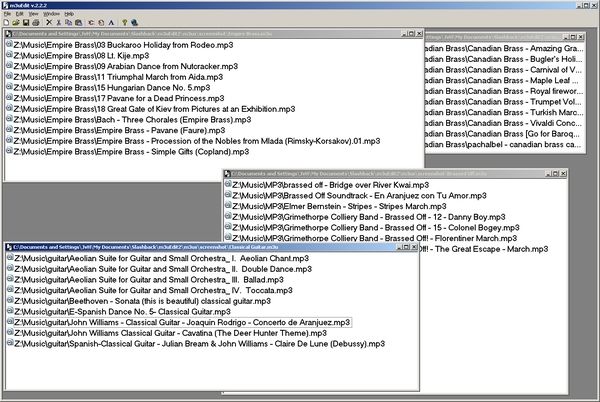
m3uEdit is a robust m3u playlist creator/editor. Open one or more m3u files (optionally through the context menu) and drop filenames on them to add, drag the files into any order, or drag-n-drop between different m3u files.
In depth
A closer look at m3uEdit2
m3uEdit is an m3u playlist creator/editor. You can drag-n-drop ANY type of files from Windows Explorer and they will be added to the end of the playlist. It accepts any filetype so that playlists for any media type can be made. For instance, Windows Media Player can play videos, WMA, and MP3 files from a single playlist. m3u files can be opened through the menu or toolbar, or can be simply dropped on the gray background. Options include opening m3u files in m3uEdit via the context menu. Once a file is opened (or created), any media file(s) (actually, any file at all) can be dropped onto the white file background and it/they will be inseted into the list at the position dropped, or at the end of the list. You can drag the filenames around to get them in the order you want. Several m3u files can be open at once within m3uEdit. Items from one list can be highlighted and dragged to another list. In general, m3uEdit will only have one session open at a time; if you open another file via the context menu, it will open in the m3uEdit sessioSeveral m3u files can be open at once within m3uEdit. Items from one list can be highlighted and dragged to another list. In general, m3uEdit will only have one session open at a time; if you open another file via the context menu, it will open in the m3uEdit session already running
Requirements
System requirements
Windows 95 or newer
Verdict
Should you download m3uEdit2?
m3uEdit2 runs on
Windows 10/11
and is available under the
Shareware
license
— the installer is 480 KB.
We’ve catalogued it under
Multimedia and Presentation.
✓
Verified clean. Every m3uEdit2 build on SoftLookup is scanned for viruses, spyware, adware, trojans and backdoors. We re-test on every update.
Sponsored
At a glance
m3uEdit2 specifications
- Last updated
- Feb 11, 2025
- Requirements
- Windows 95 or newer
- License
- Shareware
- Operating system
- Windows 10/11
- File size
- 480 KB
- Price
- $10
- Page views
- 540
Help fellow users decide. Share your experience with m3uEdit2.