Overview
What is CrazyInfo?
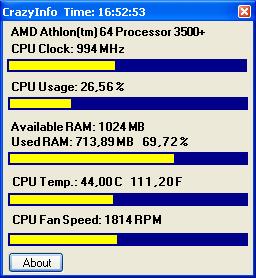
Small tool for displaying the CPU clock, CPU usage, RAM usage! If you own an ASUS mainboard, use the CrazyInfo_ASUS.exe. You get additional infos about the CPU temp. and the CPU fan speed. First you must have installed Asus PCProbe.
In depth
A closer look at CrazyInfo
Small tool for displaying the CPU clock, CPU usage, RAM usage! If you own an ASUS mainboard, use the CrazyInfo_ASUS.exe. You get additional infos about the CPU temp. and the CPU fan speed. First you must have installed Asus PCProbe. Then copy the CrazyInfo_ASUS.exe into the PCProbe directory and run it.
Requirements
System requirements
Microsoft .NET Framework 2.0
Verdict
Should you download CrazyInfo?
CrazyInfo runs on
Windows 10/11
and is available under the
Freeware
license
— the installer is 126 KB.
We’ve catalogued it under
General.
✓
Verified clean. Every CrazyInfo build on SoftLookup is scanned for viruses, spyware, adware, trojans and backdoors. We re-test on every update.
Sponsored
At a glance
CrazyInfo specifications
- Last updated
- May 11, 2025
- Requirements
- Microsoft .NET Framework 2.0
- License
- Freeware
- Operating system
- Windows 10/11
- File size
- 126 KB
- Price
- Free
- Page views
- 534
Help fellow users decide. Share your experience with CrazyInfo.