Overview
What is CrazyBackup?
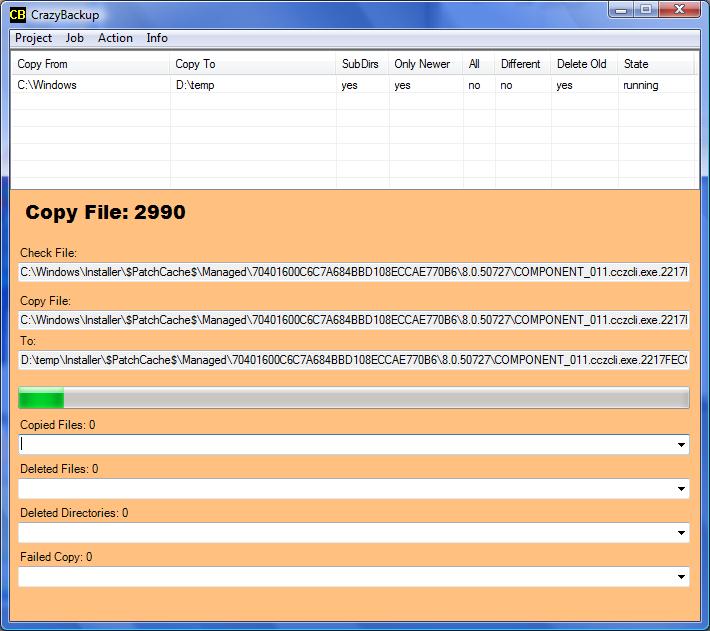
CrazyBackup backups your selected directories and files. Select to copy all files or only all newer files or all different files, with subdirs or not and delete unneeded files and dirs from the destination location.
In depth
A closer look at CrazyBackup
CrazyBackup backups your selected directories and files. Select to copy all files or only all newer files or all different files, with subdirs or not and delete unneeded files and dirs from the destination location.
Requirements
System requirements
.NET Framework 2.0
Verdict
Should you download CrazyBackup?
CrazyBackup runs on
Windows 10/11
and is available under the
Freeware
license
— the installer is 120 KB.
We’ve catalogued it under
General.
✓
Verified clean. Every CrazyBackup build on SoftLookup is scanned for viruses, spyware, adware, trojans and backdoors. We re-test on every update.
Sponsored
At a glance
CrazyBackup specifications
- Last updated
- Nov 18, 2025
- Requirements
- .NET Framework 2.0
- License
- Freeware
- Operating system
- Windows 10/11
- File size
- 120 KB
- Price
- Free
- Page views
- 507
Help fellow users decide. Share your experience with CrazyBackup.