VORG Express : Keep track of various upcoming events, create a list of contacts, set tasks, take notes and organize documents by turning to this app
If you lead a busy life, you might be already using an organizer to keep track of various events, tasks, notes or contacts without having to remember all of that information.However, instead of relying on the old pen and paper method, you might want to try a more modern approach: turning to specialized software solutions such as VORG Express.
Organize contacts and other stuff
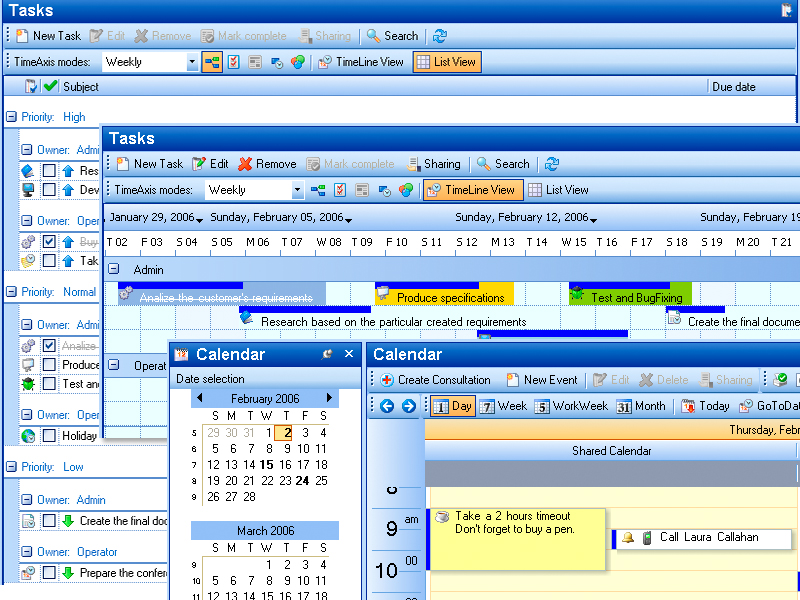
As hinted above, you can turn to this application if you have an overflowing schedule or contact book and need a place to put all that data, since it can handle anything from contacts and events to tasks, notes and even documents.Once you launch the program, you'll be greeted by a familiar interface that resembles that of an older version of Microsoft Office. Navigating between the various sections can be easily done by using the menu on the left side.
Mail or SMS contacts
If you want more advanced controls, you'll be glad to know that you can send e-mails and SMSes to your contacts by simply selecting them and using the features under the "Actions" category on the right side of the screen.For even more control over the app, it's possible to navigate to the "Settings" section and change the language and short date format, as well as optimize the database, enable automatic login, enable tray notifications and hide the app whenever it's minimized.
Handy organizer app
All in all, if you're looking for a program that can help you organize contact info, events, tasks, notes and documents, you might want to give VORG Express a try. It comes with a familiar user interface, enables you to send emails and SMSes to your contacts and lets you customize some of its options.
VORG Express runs on
Windows 10/11
and is available under the
Shareware
license
— the installer is 19.1 MB.
We’ve catalogued it under
Multimedia and Presentation.
Help fellow users decide. Share your experience with VORG Express.