nPassword : Keep your passwords in a secured environment, create and manage entries and groups, generate random keys, edit macros, configure hotkeys, back up data, and more
nPassword is an advanced and approachable password manager that has some interesting features, such as a random key generator, macro editor, and hotkey support.
Setup and interface
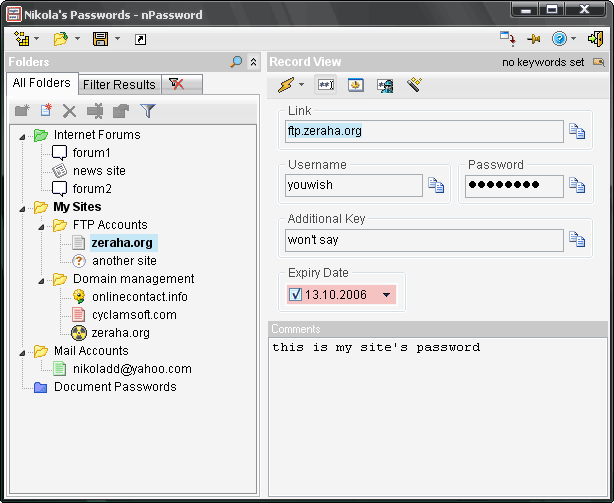
The installation operation doesn't take a long time to finish, and the only notable aspect about it is that nPassword can make file associations with the .npw format.When running the application for the first time, it's highly recommended to specify a master password in order to prevent other users from accessing your sensitive data.nPassword is packed in a clean and intuitive interface that, although it doesn't contain modern and attractive graphical elements, it's very easy to navigate.
Create and manage records and categories
You can fill the database with multiple records and organize them into different categories (e.g. home, work), resort to a common search function to track down records, as well as copy or duplicate nodes (i.e. a record, subcategory, or a category with all containing subcategories and records).Records can be populated with a URL, username, password, additional key, expiration date, and personalized comments, such as reminders. You can open links in the default browser, mask or unmask the password field, as well as use a macro editor to automatically fill fields into any program.
Generate random keys, back up data, and configure settings
The software application also features a random password generator that can generate speakable keys (dictionary-based) or secure ones by defining rules with the password length and characters to include (uppercase, lowercase, numbers, user-defined symbols).The database can be saved to a password-protected file (nPass DataBank format) and opened later. Moreover, it can compress saved data, automatically save information, create backups, stay on top of other windows, minimize to the system tray, and prevent Clipboard monitoring, among others. It supports keyboard shortcuts for showing and hiding the app, filling in a user name and password, and showing the quickpass dialog (the hotkeys can be reconfigured).
Evaluation and conclusion
The software application didn't put a strain on the computer's performance during our tests, since it needed low CPU and RAM to work properly. It had a good response time to commands and didn't hang, crash or display error messages.On the other hand, the interface needs some work in the visual department. Too bad that nPassword doesn't offer support for importing and exporting password databases to file formats compatible with other applications in its field, like LastPass, KeePass or RoboForm.Nevertheless, nPassword comes loaded with some powerful options and configuration parameters for keeping your passwords neatly stored in a secured environment.
nPassword runs on
Windows 10/11
and is available under the
Freeware
license
— the installer is 664 KB.
We’ve catalogued it under
General.
Help fellow users decide. Share your experience with nPassword.