SpotIE Password Recovery : Recover passwords saved in Internet Explorer, namely account, HTTP authentication, and FTP passwords using simple actions, and copy the results to the clipboard
SpotIE Password Recovery is a small software application specialized in recovering lost or forgotten passwords which were stored via Internet Explorer. The utility works with all types of passwords saved by Internet Explorer 7, 8, and 9.It is important to mention from the start that program is able to restore IE passwords, if they were previously saved. For example, when you want to log in to one of your accounts, you are required to input the username and password. The web browser may ask if you want to save the password or not. In case you opt for saving it, it is stored as an AutoComplete password.Besides account passwords, the tool offers you the possibility to retrieve HTTP authentication and FTP passwords.
Clean and simple looks
It takes a fast installation process in order to get access to a straightforward GUI. There’s no support for a help manual, only a description of the utility’s main features can be found online. Decoding the dedicated parameters won’t take much of your time because they look very intuitive.
How it works
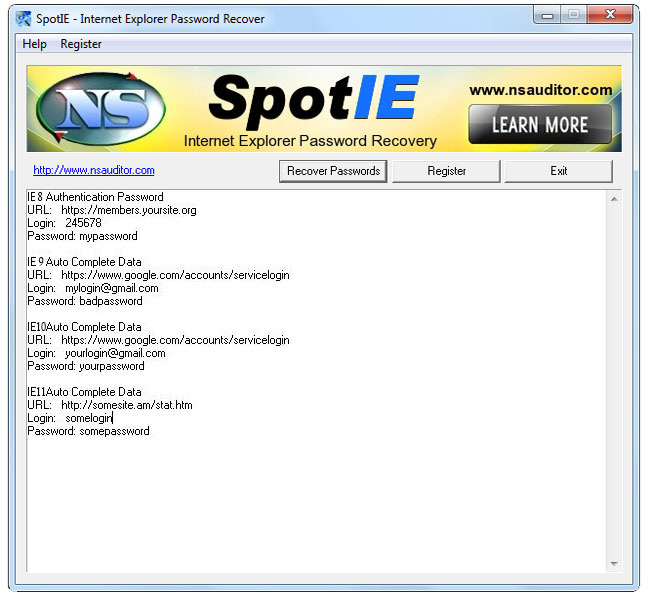
The best part about working with SpotIE Password Recovery is that the password scanning and retrieval process is performed without user’s intervention. You do not even have to specify the location where Internet Explorer stores the saved passwords.The application automatically scans data and reveals the lost passwords directly in the main window. It shows information about the URL, username, and password. The retrieved passwords can be exported to the clipboard so you can quickly transfer them into other third-party utilities.Tests have shown that SpotIE Password Recovery executes tasks quickly and without errors. It is not a resource hog so you do not have to worry that it burdens the overall performance of the computer.
Final observations
The bottom line is that SpotIE Password Recovery has to offer a straightforward approach for helping you recover all sorts of IE passwords, and can be handled by rookies and professionals alike.
Windows 8 / Windows 7 64 bit / Windows 7 / Windows Vista 64 bit / Windows Vista / Windows XP / Windows 2000
SpotIE Password Recovery runs on
Windows 10/11
and is available under the
Time-limited Trial
license
— the installer is 1.8 MB.
We’ve catalogued it under
General.
Help fellow users decide. Share your experience with SpotIE Password Recovery.