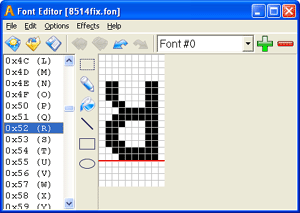
Sib Font Editor : Create, design and export fonts, save symbols as bitmaps, customize font properties, and resort to approachable drawing tools at a pixel level
Sib Font Editor is an advanced tool that puts a user-friendly workspace at your disposal for creating, designing and exporting fonts.Although it's geared toward experienced users, it can also be tackled by those curious enough to learn how this process takes place.
Simple setup and interface
After a speedy installation that shouldn't give you any trouble, you're welcomed by a large frame with a well-structured layout and simple design, which lets you quickly dive into the configuration procedure.
Create and design fonts
You can either open an existing font file (FNT or FON format), or create a new one by indicating the font name, copyright, character height and width, zero level, first and last character index, along with constant or variable pitch.Basic drawing tools are put at your disposal for creating each font character, such as selection, pencil, line, rectangle and ellipse. Worth noting is that the design is done at the pixel level.
Customize program settings
It's possible to undo and redo your actions, flip the image horizontally or vertically, change font preferences initially specified, and view the font header, such as version, copyright, size, type, international and external leading, ascent, character set, or pixel height and width.Symbols can be exported to images with the BMP filetype and later imported, while the font can be saved to FNT or FON format.
Evaluation and conclusion
It didn't put a strain on system performance in our tests, since it used low CPU and RAM. It worked smoothly, without freezing, crashing or prompting errors. Help documentation is available.To sum it up, Sib Font Editor comes bundled with powerful and approachable tools for designing fonts. It can be handled by all types of users, whether or not they have experience with this kind of software products.
Sib Font Editor runs on
Windows 10/11
and is available under the
Time-limited Trial
license
— the installer is 5 MB.
We’ve catalogued it under
General.
Help fellow users decide. Share your experience with Sib Font Editor.