Screenshot Studio : Take screenshots by capturing the entire screen, window or custom region, annotate images using text and arrows, and print, email or share the captured photos
Screenshot Studio is a Windows graphic capture utility whose purpose is to help you take screenshots, edit the images using several dedicated tools, as well as share them with your friends or work colleagues.
User interface
The program places a small button on your desktop which allows you to access a set of actions each time you hover your mouse cursor over it. Aside from the small button, you can control the settings from your system tray.
Take snapshots using different modes
Screenshot Studio gives you the possibility to make use of different capture modes, namely fullscreen, window or user-defined region (rectangle or ellipse). In addition, you can make the application take screenshots in 5 seconds.
Editing features
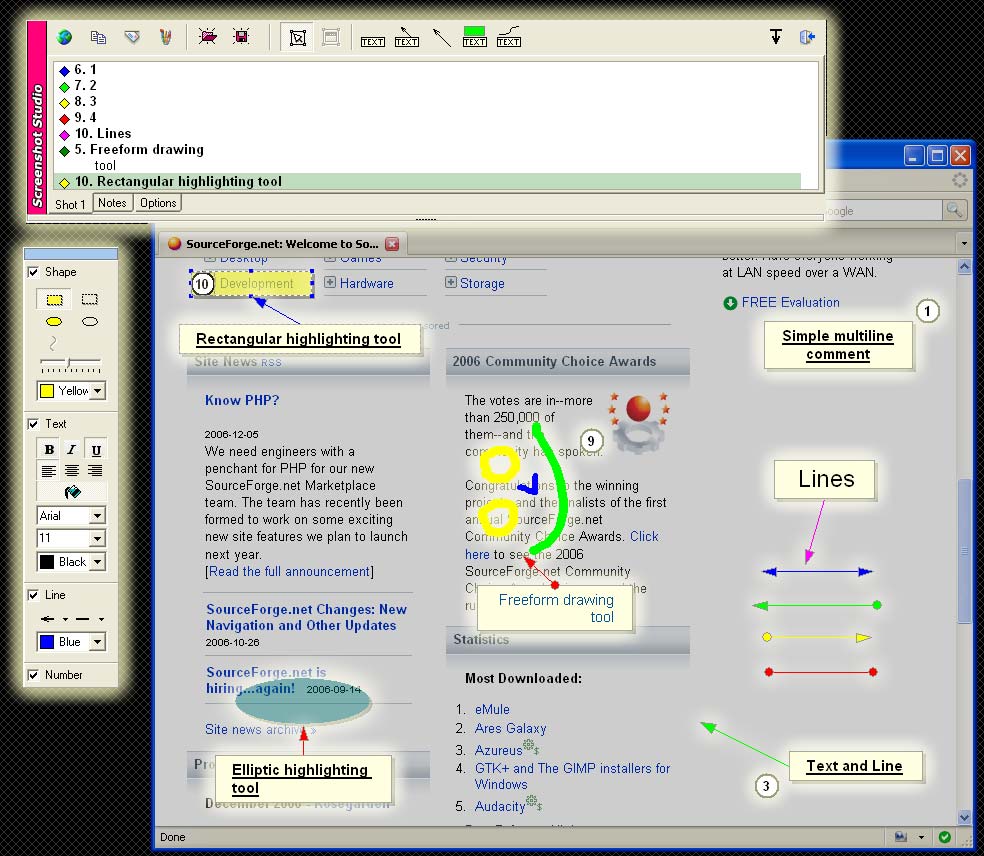
The tool enables you to alter the screenshots using the built-in editor. The editor can be shown after you take each snapshot. It offers a preview of the captured image and you may also import files from the clipboard or custom photos from your computer.Screenshot Studio keeps a history with screenshots and helps you make quick adjustments to the pictures. You are allowed to insert annotations with different shapes and colors, assign numbers to each annotation, and insert text, which can be customized in terms of font, size and color.What’s more, you can draw freehand designs, insert arrows which point to an essential part of the image, as well as embed text and images.When it comes to exporting options, you may print or email the snapshots, copy them to the clipboard, and upload files on Twitter, Facebook, EasyCaptures, Flickr, Picasa, ImageShack, or via FTP connections. In addition, you can save the pictures to JPEG, PNG, GIF, BMP, or PDF file format.
Configuration settings
You can run the program at startup, make file associations (BMP, GIF, JPEG, PNG), assign hotkeys for taking screenshots and showing the editor, play sound when the screen is captured, set up file naming rules, and embed annotation info within PNG files.
Final words
All in all, Screenshot Studio comes bundled with several handy features for screen capturing, annotation and web sharing, and can be mastered by beginners and professionals alike. It offers very good output results without hampering your system performance.
Screenshot Studio runs on
Windows 10/11
and is available under the
Time-limited Trial
license
— the installer is 1.9 MB.
We’ve catalogued it under
General.
Help fellow users decide. Share your experience with Screenshot Studio.