Overview
What is Replay Media Splitter?
Replay Media Splitter - Cut files into fragments by duration, size, or equal parts, trim audio or video items using time markers, preview the videos and listen to songs
In depth
A closer look at Replay Media Splitter
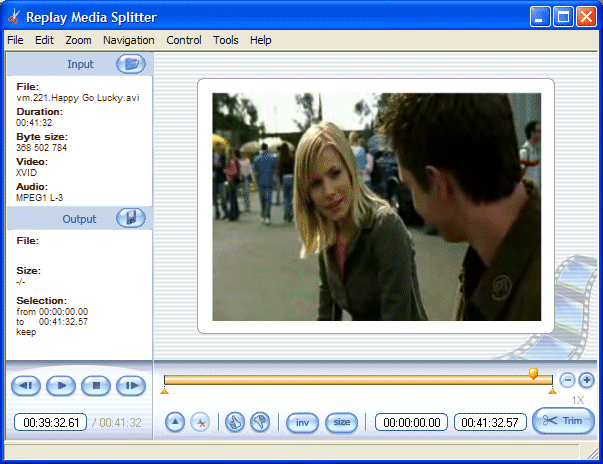
Replay Media Splitter The GUI looks well organized and allows you to drag and drop videos and audio files directly in the main window. The tool works with several file formats, such as AVI, WMV, ASF, WMA, MP3, MOV, MP4, and MKV. Thanks to the integrated player, you can easily watch clips or listen to songs. You may start, pause, or stop the current selection, jump to the next or previous frame, go to a certain frame, adjust the volume, and view information about the input file (name, duration, byte size, video and audio codec) and output item (e.g. size, selection).
Requirements
System requirements
Windows 10 64 bit / Windows 10 / Windows 8 64 bit / Windows 8 / Windows 7 64 bit / Windows 7 / Windows Vista 64 bit / Windows Vista / Windows XP 64 bit / Windows XP
Verdict
Should you download Replay Media Splitter?
Replay Media Splitter runs on
Windows 10/11
and is available under the
Demo
license
— the installer is 31.3 MB.
We’ve catalogued it under
Audio Video.
✓
Verified clean. Every Replay Media Splitter build on SoftLookup is scanned for viruses, spyware, adware, trojans and backdoors. We re-test on every update.
Sponsored
At a glance
Replay Media Splitter specifications
- Last updated
- Nov 19, 2025
- Requirements
- Windows 10 64 bit / Windows 10 / Windows 8 64 bit / Windows 8 / Windows 7 64 bit / Windows 7 / Windows Vista 64 bit / Windows Vista / Windows XP 64 bit / Windows XP
- License
- Demo
- Operating system
- Windows 10/11
- File size
- 31.3 MB
- Price
- $29.95
- Page views
- 715
Help fellow users decide. Share your experience with Replay Media Splitter.