AutoRun Pro Enterprise : Create interactive multimedia applications and professional autorun CD menus even if you don't have an extensive programming experience
AutoRun Pro Enterprise is a rapid application development tool designed to help users who do not posses an extensive programming experience to get started with the building of their own multimedia software.
A three-panel interface
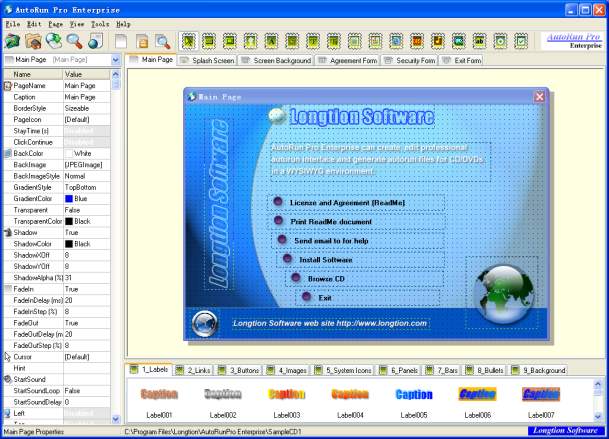
Courtesy of an easy-to-use interface, this utility enables anyone to design an application, especially since the entire process is a visual one, without the need to write actual code. It also allows for the fast creation of autorun CD menus for those interested in publishing their documents, presentations, and other content on portable media.Offering a three-panel view of a project in progress, the software enables users to track changes to their autorun menus in the editing window on the right, to view and add elements such as buttons or icons from the bottom pane, and to edit selected elements from the left one.
A multitude of templates to work with
Building an autorun CD menu from scratch can prove a simple task with the help of AutoRun Pro Enterprise, since it provides a multitude of templates and template elements to choose from, making the creation of an interface a hassle-free action.Users can opt in for one of the many button layouts, while also being able to modify their color and caption, as well as text font or size. Support for drag-and-drop enables them to add new visual elements to their project in no time.
Easily add new content to a project
Once users have decided upon the template to go with, they can start adding new elements to the autorun menu by simply clicking on the row of buttons at the top of the editing window.These offer a variety of options, ranging from the possibility to add text or images to the project's interface to the ability to insert a progress bar, scroll bar, balloons, or new buttons. The app also comes with a built-in CD/DVD burner, making it easy to publish a finalized project on portable media.
Finally
All in all, AutoRun Pro Enterprise is a handy tool to create autorun CD menus within minutes, even without programming skills. It is fast and intuitive, while also offering a wide-enough variety of editing options to deliver a professional-grade experience.
Windows 10 64 bit / Windows 10 / Windows 2008 / Windows 2003 / Windows 8 64 bit / Windows 8 / Windows 7 64 bit / Windows 7 / Windows Vista 64 bit / Windows Vista / Windows XP 64 bit / Windows XP / Windows 2000
AutoRun Pro Enterprise runs on
Windows 10/11
and is available under the
Time-limited Trial
license
— the installer is 15.7 MB.
We’ve catalogued it under
Multimedia and Presentation.
Help fellow users decide. Share your experience with AutoRun Pro Enterprise.