Overview
What is R-Mail for Outlook?
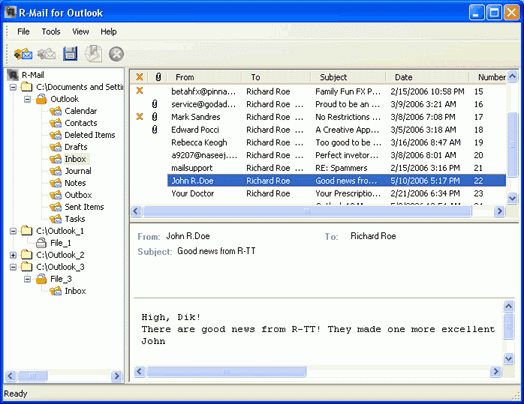
R-Mail for Outlook recovers accidentally deleted Outlook e-mail messages, contacts, notes, tasks and other items, and repairs damaged Outlook data files (*.pst) files where Outlook stores folders with the data.
In depth
A closer look at R-Mail for Outlook
R-Mail for Outlook recovers accidentally deleted Outlook e-mail messages, contacts, notes, tasks and other items, and repairs damaged Outlook data files (*.pst) files where Outlook stores folders with the data. The recovered data can be saved in the *pst, *.msg, and *.eml formats that Outlook can open and import. When doing any operation, including Outlook data file recovery, R-Mail for Outlook never deletes from disks, writes to, or modifies in any way original Outlook data file. R-Mail for Outlook Demo limitations do not allow you to save recovered e-mail messages, contacts, notes, and other items, and view them in Outlook but you can preview the recovered messages in the Demo, backup the *.pst data file and then use the commercial R-Mail for Outlook version to recover the data completely. Microsoft Vista OS is supported.
Requirements
System requirements
At least 32 MB of RAM, a mouse, and enough disk space for recovered files
Verdict
Should you download R-Mail for Outlook?
R-Mail for Outlook runs on
Windows 10/11
and is available under the
Demo
license
— the installer is 1382 KB.
We’ve catalogued it under
General.
✓
Verified clean. Every R-Mail for Outlook build on SoftLookup is scanned for viruses, spyware, adware, trojans and backdoors. We re-test on every update.
Sponsored
At a glance
R-Mail for Outlook specifications
- Last updated
- Nov 16, 2025
- Requirements
- At least 32 MB of RAM, a mouse, and enough disk space for recovered files
- License
- Demo
- Operating system
- Windows 10/11
- File size
- 1382 KB
- Price
- $114.99
- Page views
- 628
Help fellow users decide. Share your experience with R-Mail for Outlook.