Overview
What is PhotoWipe?
PhotoWipe : A revolutionary imaging tool that magically removes unwanted objects from your photos
In depth
A closer look at PhotoWipe
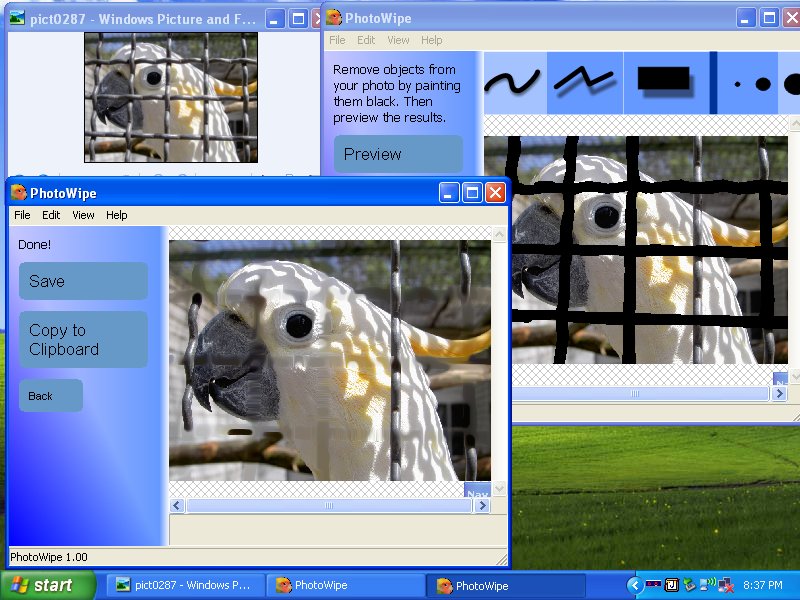
PhotoWipe is a program designed to help you remove unwanted elements from pictures. Whether it’s a stain on the shirt, a person you want out of the image or various writings, a specialized tool is needed.PhotoWipe comes with a nice, clean interface that focuses on the image that’s being retouched. The software can open JPG and PNG files, as well as PWW (PhotoWipe Workspace), a format native to the app.After loading the image, one of the provided tools can be used to paint over the areas that need to be removed. You can choose between two line types and two shapes, as well as pick the thickness of the brush. The app also provides an eraser that permits rectifications on all areas.Basically, the app uses the neighboring colors to reshape the image. The result depends on the amount of details that need to be retouched and the input image’s quality.After all the areas that need adjusting have been marked, the quality level for your preview (quick, medium, full) can be selected. If you’re content with the output, the file can be saved to the computer or copied to Clipboard in order to be used in another photo editor.The image processing doesn’t take long, but it depends on the size of the picture, the amount of retouching done and the chosen quality. Files can be saved as JPGs or PNGs.All in all, PhotoWipe is a nice tool that can come in handy quite often, especially if editing pictures is one of your passions. Inexperienced users should find this app easy to work with.
Verdict
Should you download PhotoWipe?
PhotoWipe runs on
Windows 10/11
and is available under the
Freeware
license
— the installer is 1 MB.
We’ve catalogued it under
Graphics Conversion.
✓
Verified clean. Every PhotoWipe build on SoftLookup is scanned for viruses, spyware, adware, trojans and backdoors. We re-test on every update.
Sponsored
At a glance
PhotoWipe specifications
- Last updated
- Nov 18, 2025
- License
- Freeware
- Operating system
- Windows 10/11
- File size
- 1 MB
- Price
- Free
- Page views
- 1010
Help fellow users decide. Share your experience with PhotoWipe.