Magic Enhancer Lite : An image modification tool that provides users with the possibility to easily adjust lightness, contrast and color balance of their images
Magic Enhancer Lite is a Photoshop-compatible plugin designed to provide users with the possibility to easily enhance their images.
Easy-to-use interface
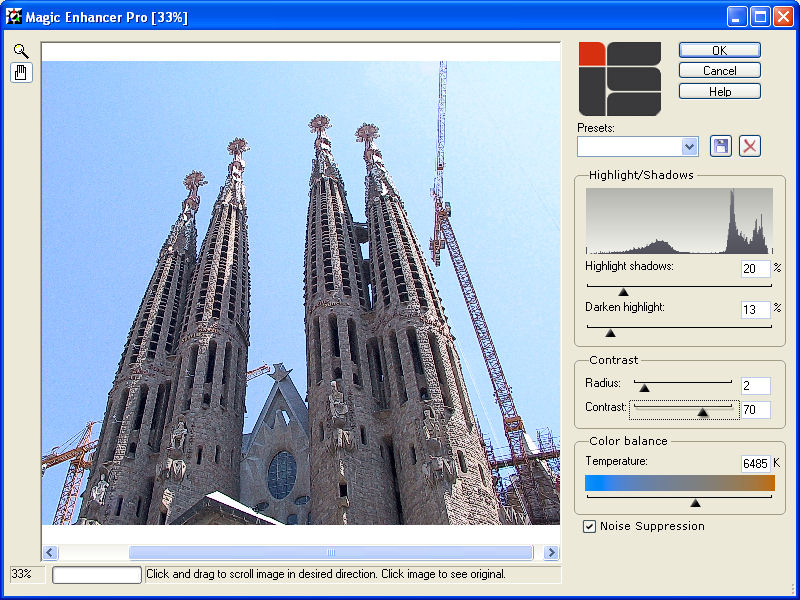
The tool comes with a simple, straightforward interface, which provides users with direct access to all of the included functionality.The tool's workspace offers a preview of the selected image, and also shows any of the applied changes in real-time, thus allowing users to make further modifications to their photos effortlessly.One thing that should be noted here is the fact that there's no “undo” button available in the utility, which means that users won't be able to selectively revert changes.
Apply various photo enhancements
The plug-in allows users to make various modifications to their images, starting with changing their color balance. Moreover, users are provided with the option to modify the contrast of selected photos, and to change their Highlight/Shadows.Users should keep in mind that, while all these features are available in both the Lite and the Pro versions of the tool, the latter also offers access to Noise Suppression capabilities.
Outdated Photoshop compatibility
During our testing (we used a Photoshop-compatible program for that), we noticed that the plug-in can perform quite fast, and that any of the selected changes are displayed instantly in the tool's workspace.What should be mentioned here is the fact that the utility does not appear to be compatible with the latest version of Photoshop, and that users might not be able to take advantage of its capabilities unless they have an older iteration of the software.
In conclusion
All in all, Magic Enhancer is an easy-to-use, intuitive Photoshop plug-in that allows users to improve their photos effortlessly. It allows them to highlight shadows in their images, to modify contrast, and to change a photo's color balance, while also previewing all of the selected changes in real-time, in its main window.
Magic Enhancer Lite runs on
Windows 10/11
and is available under the
Demo
license
— the installer is 1.7 MB.
We’ve catalogued it under
Graphics Conversion.
Help fellow users decide. Share your experience with Magic Enhancer Lite.