MS Word Print Multiple Documents Software : Print Microsoft Word files with the .doc extension in batches using this simple tool that lets you pick the printing device and delay time to skip blank pages
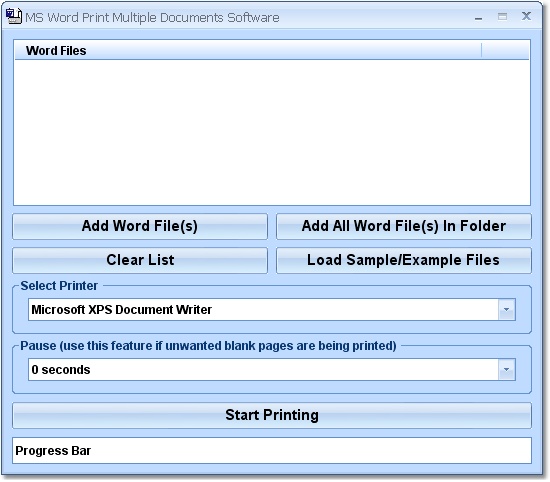
MS Word Print Multiple Documents Software is a tool designed to print multiple Microsoft Word documents at the same time. It comes packed with a simple set of options that can be handled with ease.
Run the app as administrator
All you have to do is drag and drop the files to create a queue. Then you can leave the PC unattended while the printing device is doing its job.After a speedy setup operation that doesn't require special attention, it might be necessary to launch the tool with administrative privileges in order to avoid errors.
Convert DOC files in batch
In the main application window, you can add Word documents using the drag-and-drop method or built-in file browser or folder view.A couple of sample files are included in the installed directory to give you an idea of how MS Word Print Multiple Documents Software works.
Cannot work without Microsoft Word installed
You should know that only files with the DOC extension are supported. Those with DOCX or DOCM aren't recognized by this program. Furthermore, Microsoft Word must be installed or the conversion procedure won't be successful.Before triggering the task, you can pick the printing device from a list, along with the delay time if you want to skip blank pages (ranging from 0 to 9 seconds).If you have a virtual PDF printer installed, you can create PDF documents from the DOCs instead of printing the content on physical paper.
DOC printer with just a handful of features
Sadly, this is where the utility's functionality ends. As you can see, it cannot work without Microsoft Word and comes bundled with a limited set of options.Other applications offer the same features for free, while the full edition of MS Word Print Multiple Documents Software is quite expensive. Nevertheless, you can test it for yourself.
MS Word Print Multiple Documents Software runs on
Windows 10/11
and is available under the
Demo
license
— the installer is 5 MB.
We’ve catalogued it under
General.
Help fellow users decide. Share your experience with MS Word Print Multiple Documents Software.