Overview
What is ChatterBlocker?
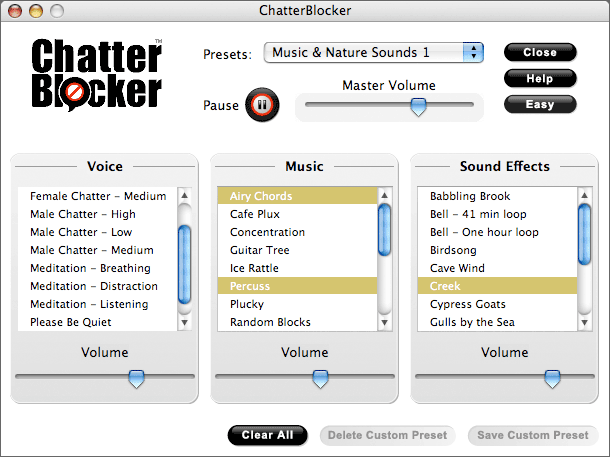
ChatterBlocker masks unwanted conversations so you can focus on your work, not your coworkers. Using a soothing blend of nature sounds, music and background voices, ChatterBlocker minimizes the intelligibility and distraction of intrusive speech.
In depth
A closer look at ChatterBlocker
ChatterBlocker uses digital audio technology to mask the sound of speech and other distractions so you can focus on your work, not your coworkers. ChatterBlocker does not use noise cancellation. Instead, it masks unwanted conversations using a soothing blend of nature sounds, music and background voices. The goal is to render speech unintelligible, since intelligible speech is often the most distracting sound in the workplace. ChatterBlocker also offers mindfulness meditation tracks intended to increase concentration, reduce distractibility and minimize the stress response to office noise. ChatterBlocker works with headphones or speakers. You can use ChatterBlocker to tune out distractions and increase concentration at the office, airports, cafes or anywhere.
Requirements
System requirements
500 MHz processor, 128 MB RAM recommended, 75 MB hard disk space
Verdict
Should you download ChatterBlocker?
ChatterBlocker runs on
Windows 10/11
and is available under the
Shareware
license
— the installer is 12690 KB.
We’ve catalogued it under
General.
✓
Verified clean. Every ChatterBlocker build on SoftLookup is scanned for viruses, spyware, adware, trojans and backdoors. We re-test on every update.
Sponsored
At a glance
ChatterBlocker specifications
- Last updated
- Mar 12, 2025
- Requirements
- 500 MHz processor, 128 MB RAM recommended, 75 MB hard disk space
- License
- Shareware
- Operating system
- Windows 10/11
- File size
- 12690 KB
- Price
- $19.95
- Page views
- 623
Help fellow users decide. Share your experience with ChatterBlocker.