Overview
What is Sonar Screensaver?
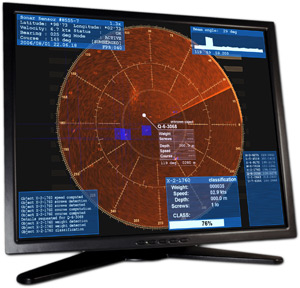
This screensaver simulates a fabulous sonar detector dropped to deeps somewhere in ocean. It displays operator's display where located famous circular screen with rotating beam and many other information. It also allows leaving on-screen messages.
In depth
A closer look at Sonar Screensaver
Sonar simulation screensaver displays a fabulous sonar screen with famous rotating beam and object marks. There are lot of decoration elements, like orthogonal and circular scaling grids, markers, various windows with information. And all this beauty will be accompanied with many sounds including underwater noises, whale songs, screws and cinematographic effects.When running in "on-screen-message" mode it can display text messages instead of simply closing when touching mouse or keyboard. This can be useful for leaving workplace without wondering that somebody will not know where you are and when you are going to be back.
Requirements
System requirements
32MB OpenGL graphics card, Pentium-III, 128MB of RAM
Verdict
Should you download Sonar Screensaver?
Sonar Screensaver runs on
Windows 10/11
and is available under the
Shareware
license
— the installer is 2683 KB.
We’ve catalogued it under
Miscellaneous Collections.
✓
Verified clean. Every Sonar Screensaver build on SoftLookup is scanned for viruses, spyware, adware, trojans and backdoors. We re-test on every update.
Sponsored
At a glance
Sonar Screensaver specifications
- Last updated
- Feb 13, 2025
- Requirements
- 32MB OpenGL graphics card, Pentium-III, 128MB of RAM
- License
- Shareware
- Operating system
- Windows 10/11
- File size
- 2683 KB
- Price
- $19.95
- Page views
- 449
Help fellow users decide. Share your experience with Sonar Screensaver.