Overview
What is TrialwareDialog ActiveX Control?
TrialwareDialog ActiveX Control is for software developers who are looking for a simple way to implement a trial version of their software product. The TrialwareDialog ActiveX Control works similar to the Microsoft Common Dialog control.
In depth
A closer look at TrialwareDialog ActiveX Control
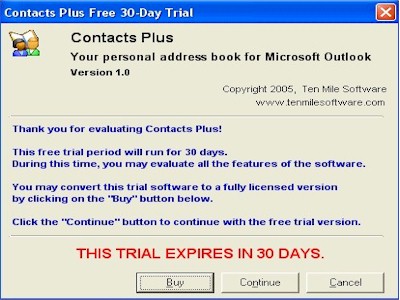
TrialwareDialog ActiveX Control is for software developers who are looking for a simple way to implement a trial version of their software product. The TrialwareDialog ActiveX Control works similar to the Microsoft Common Dialog control and simplifies the process of creating a trial version of your product by exposing properties and methods to create a simple trial dialog window to display to your users. Select from two trial styles: number of days since first run or number of total runs. You select the number of days or runs by which to limit the trial; display your own company name, company web site URL, product name, description, and version, and copyright text on the trial dialog window; "Buy" button allows you to interface the trial dialog window with your own purchase/registration methodology; sensitive data such as initial and last run dates and run counters are encrypted for your protection.
Verdict
Should you download TrialwareDialog ActiveX Control?
TrialwareDialog ActiveX Control runs on
Windows 10/11
and is available under the
Freeware
license
— the installer is 1834 KB.
We’ve catalogued it under
ActiveX.
✓
Verified clean. Every TrialwareDialog ActiveX Control build on SoftLookup is scanned for viruses, spyware, adware, trojans and backdoors. We re-test on every update.
Sponsored
At a glance
TrialwareDialog ActiveX Control specifications
- Last updated
- Feb 16, 2025
- License
- Freeware
- Operating system
- Windows 10/11
- File size
- 1834 KB
- Price
- Free
- Page views
- 383
Help fellow users decide. Share your experience with TrialwareDialog ActiveX Control.