Overview
What is LanBuster?
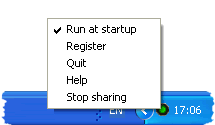
When you need all your computers resources for yourself. LanBuster lets you easily turn on or off filesharing. Lanbuster runs in the system tray, and signals with the icon color whether the LAN has been disabled or not.
In depth
A closer look at LanBuster
When you need all your computers resources for yourself. LanBuster lets you easily turn on or off filesharing. LanBuster runs in the system tray, and signals with the icon color whether the LAN has been disabled or not. A double click on the icon in the system tray is all that is needed to control the state of your filesharing. Your internet connection is not affected. LanBuster can be useful for everything from mp3 encoding, cd-bruning to online gaming.
Verdict
Should you download LanBuster?
LanBuster runs on
Windows 10/11
and is available under the
Shareware
license
— the installer is 550 KB.
We’ve catalogued it under
FTP Tools.
✓
Verified clean. Every LanBuster build on SoftLookup is scanned for viruses, spyware, adware, trojans and backdoors. We re-test on every update.
Sponsored
At a glance
LanBuster specifications
- Last updated
- Feb 18, 2025
- License
- Shareware
- Operating system
- Windows 10/11
- File size
- 550 KB
- Price
- $14.95
- Page views
- 395
Help fellow users decide. Share your experience with LanBuster.