Overview
What is 1st Security Administrator-Pro?
Restrict access to Windows, protect PC, password-protect boot, apply access restrictions to PC, deny access to Control Panel, disable boot keys, context menus, DOS, Registry editing, Internet, network access. Hide desktop icons, disk drives, etc.
In depth
A closer look at 1st Security Administrator-Pro
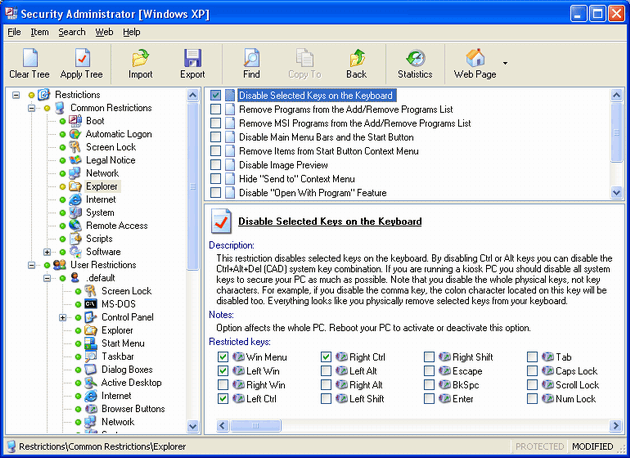
Restrict access to Windows applications, protect PC, and password-protect boot with 1st Security Administrator. This is the best professional password-protected security utility to apply access restrictions to PC, and to protect your privacy stopping others from tampering with your desktop. Deny access to Control Panel and its applets, disable interruption boot keys securing boot, context menus, DOS, Registry editing, Internet and Network access. Hide desktop icons, individual drives, Start Menu items, taskbar, task manager, tray icons. Apply password protection to Windows and restrict users to running applications. Control Internet Usage, spy on PC users. Security restrictions can be applied universally or to specific PC users. 1st Security Administrator is very simple and easy-to-use as well as very functional and useful.
Verdict
Should you download 1st Security Administrator-Pro?
1st Security Administrator-Pro runs on
Windows 10/11
and is available under the
Shareware
license
— the installer is 1104 KB.
We’ve catalogued it under
Privacy and Access Control.
✓
Verified clean. Every 1st Security Administrator-Pro build on SoftLookup is scanned for viruses, spyware, adware, trojans and backdoors. We re-test on every update.
Sponsored
At a glance
1st Security Administrator-Pro specifications
- Last updated
- Feb 15, 2025
- License
- Shareware
- Operating system
- Windows 10/11
- File size
- 1104 KB
- Price
- $49
- Page views
- 387
Help fellow users decide. Share your experience with 1st Security Administrator-Pro.