Overview
What is SMSCOuntry XLbox?
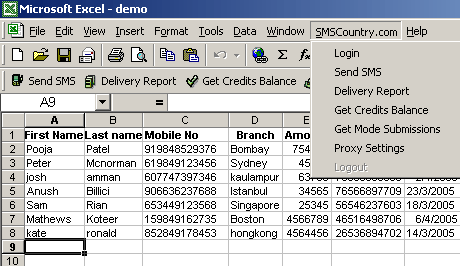
SMS-XLbox seamlessly integrates with Microsoft® Excel® and enables you to send bulk SMS text messages to mobile phones across the world from your PC using Microsoft® Excel®. SMS text delivered in 182 countries across 489 networks.
In depth
A closer look at SMSCOuntry XLbox
SMS-XLbox can be used to send Bulk SMS Text messages from Microsoft® Excel® spreadsheet to mobile phones across the world from a PC. SMS text messages can be delivered to over 489 networks in 182 countries worldwide. Delivery reports can be received instantly into the Microsoft® Excel® spreadsheet. There are a lot of business application with this software, for instance users can customise messages to each customer by mentioning the name of each recipient with his amount due and payment due date. This is an ideal tool when businesses have thousands of customers, and can do this by selecting the relevant columns in your Microsoft® Excel® spreadsheet like customer's name and mobile numbers, amount due and payment due date. users just have to download this plugin into their Microsoft® Excel® application and users can send bulk SMS to all the numbers that are in the Microsoft® Excel® file.
Requirements
System requirements
MS Excel@ 98,2000,2003
Verdict
Should you download SMSCOuntry XLbox?
SMSCOuntry XLbox runs on
Windows 10/11
and is available under the
Freeware
license
— the installer is 1495 KB.
We’ve catalogued it under
Word Processing.
✓
Verified clean. Every SMSCOuntry XLbox build on SoftLookup is scanned for viruses, spyware, adware, trojans and backdoors. We re-test on every update.
Sponsored
At a glance
SMSCOuntry XLbox specifications
- Last updated
- Jan 10, 2025
- Requirements
- MS Excel@ 98,2000,2003
- License
- Freeware
- Operating system
- Windows 10/11
- File size
- 1495 KB
- Price
- Free
- Page views
- 618
Help fellow users decide. Share your experience with SMSCOuntry XLbox.