Overview
What is Sib Icon Studio?
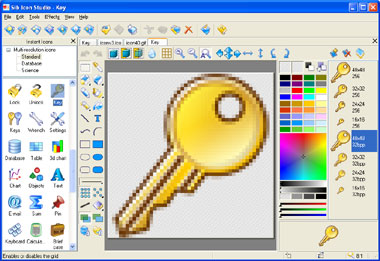
Using Sib Icon Studio you can create icons of various sizes, change color depth, create transparent icons, and much more. The comprehensive help manual will guide you through working with the program and mastering the principles of creating icons.
In depth
A closer look at Sib Icon Studio
We are please to present Sib Icon Studio 2.0 – a new release of one of the best icon and cursor editors.The program still provides the most useful options to help create beautiful icons, cursor and even *.ani cursors for Windows!
Requirements
System requirements
64MB RAM, Pentium-333 MHz, 8MB Hard Disk
Verdict
Should you download Sib Icon Studio?
Sib Icon Studio runs on
Windows 10/11
and is available under the
Shareware
license
— the installer is 2573 KB.
We’ve catalogued it under
Desktop Tools.
✓
Verified clean. Every Sib Icon Studio build on SoftLookup is scanned for viruses, spyware, adware, trojans and backdoors. We re-test on every update.
Sponsored
At a glance
Sib Icon Studio specifications
- Last updated
- Jan 9, 2025
- Requirements
- 64MB RAM, Pentium-333 MHz, 8MB Hard Disk
- License
- Shareware
- Operating system
- Windows 10/11
- File size
- 2573 KB
- Price
- $39.95
- Page views
- 698
Help fellow users decide. Share your experience with Sib Icon Studio.