Overview
What is Easy Hour Assignments with Excel?
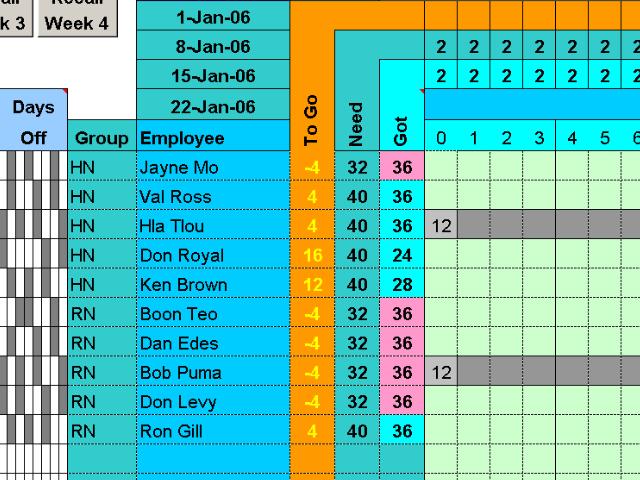
Assign daily hours to up to 25 people each day for a week. You can assign 3 groups of hours (shifts) to each person each day and track hours for 3 different groups of people. A vacation planner prevents assignments when your people are on vacation.
In depth
A closer look at Easy Hour Assignments with Excel
The Easy Hours Scheduler saves you scheduling headaches and time by letting you simply specify your daily staffing needs and then assign them to up to 25 people by inserting a number in the start time column. You can assign up to 3 groups of hours (shifts) to each person and the program keeps track of your staffing requirements for 3 different groups of employees. Bar graphs keep you informed of your scheduling progress each hour of the week and show the hours each person is scheduled to work. Up to 10 vacation periods for each employee can be entered in the vacation table and you are prevented from assigning hours to employees who are on vacation.
Requirements
System requirements
Excel 97 or later
Verdict
Should you download Easy Hour Assignments with Excel?
Easy Hour Assignments with Excel runs on
Cross Platform
and is available under the
Shareware
license
— the installer is 1931 KB.
We’ve catalogued it under
Project Management.
✓
Verified clean. Every Easy Hour Assignments with Excel build on SoftLookup is scanned for viruses, spyware, adware, trojans and backdoors. We re-test on every update.
Sponsored
At a glance
Easy Hour Assignments with Excel specifications
- Last updated
- Mar 12, 2025
- Requirements
- Excel 97 or later
- License
- Shareware
- Operating system
- Cross Platform
- File size
- 1931 KB
- Price
- $149
- Page views
- 633
Help fellow users decide. Share your experience with Easy Hour Assignments with Excel.