Overview
What is Schedule 3 Shifts Automatically?
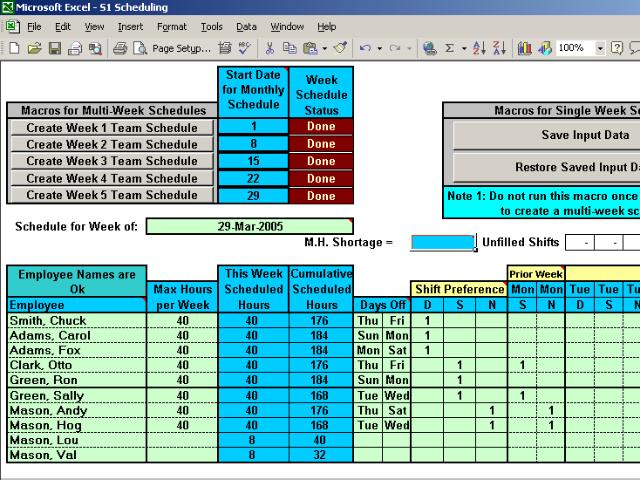
Excel spreadsheet automatically assigns 25 qualified people to 3 shifts based on your needs and their preferences, enforces rest times between shifts and assigns days off. Creates vCalendar file for your PDA, Smart Phone and Outlook Calendar.
In depth
A closer look at Schedule 3 Shifts Automatically
The Shift Schedules S1-3-25 Excel spreadsheet automatically assigns qualified people to up to 3 shifts per day in response to your scheduling needs and your employee's preferences and qualifications while enforcing rest times between shifts. The program automatically assigns days off, creates schedules for up to 1 month, produces individual and group schedules and comes in sizes for up to 200 employees. The spreadsheet has an overtime tally and scheduler so you can easily assign and keep track of overtime hours. It also creates a vCalendar file to transfer schedules to your PDA, Smart Phone and Outlook Calendar. Microsoft Excel or compatible spreadsheet program is required. During the free trial period restrictions apply with respect to the number of schedules displayed.
Requirements
System requirements
Microsoft Excel 2000 or later
Verdict
Should you download Schedule 3 Shifts Automatically?
Schedule 3 Shifts Automatically runs on
Cross Platform
and is available under the
Shareware
license
— the installer is 1360 KB.
We’ve catalogued it under
Project Management.
✓
Verified clean. Every Schedule 3 Shifts Automatically build on SoftLookup is scanned for viruses, spyware, adware, trojans and backdoors. We re-test on every update.
Sponsored
At a glance
Schedule 3 Shifts Automatically specifications
- Last updated
- Mar 12, 2025
- Requirements
- Microsoft Excel 2000 or later
- License
- Shareware
- Operating system
- Cross Platform
- File size
- 1360 KB
- Price
- $199
- Page views
- 580
Help fellow users decide. Share your experience with Schedule 3 Shifts Automatically.