Overview
What is Scotts Lansonic Remote?
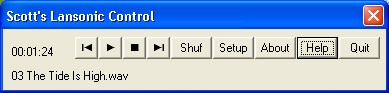
This remote control applet is designed to be used with "Lansonic" Digital Audio Servers. The Lansonic DAS was a stereo component sold sometime around 2000-2003. This utility has buttons for play, stop, next, prev, shuffle, and shows the current song.
In depth
A closer look at Scotts Lansonic Remote
This remote control applet is designed to be used with "Lansonic" Digital Audio Servers. The Lansonic DAS was a stereo component sold sometime around 2000-2003. The company's website appears to be gone, so I assume they are not manufactured anymore. This remote control sits in your windows system tray and let's you control the lansonic -- play, next, prev, etc, and see what song is currently playing. The remote control applet that came with my lansonic stopped working shortly after the company's website disappeared, and that's what prompted me to write this little system tray tool. It should work with all models of lansonic digital audio servers: the DAS-750, DAS-950, etc. This program requires the Lansonic DAS hardware -- if you don't have the hardware, the remote control is of no use to you. This software is free for noncommercial use, and has no spyware, no adware, no expiration, and no hassles whatsoever.
Requirements
System requirements
Lansonic Digital Audio Server
Verdict
Should you download Scotts Lansonic Remote?
Scotts Lansonic Remote runs on
Windows 10/11
and is available under the
Freeware
license
— the installer is 498 KB.
We’ve catalogued it under
Utilities and Tools.
✓
Verified clean. Every Scotts Lansonic Remote build on SoftLookup is scanned for viruses, spyware, adware, trojans and backdoors. We re-test on every update.
Sponsored
At a glance
Scotts Lansonic Remote specifications
- Last updated
- Feb 26, 2025
- Requirements
- Lansonic Digital Audio Server
- License
- Freeware
- Operating system
- Windows 10/11
- File size
- 498 KB
- Price
- Free
- Page views
- 509
Help fellow users decide. Share your experience with Scotts Lansonic Remote.