Overview
What is Admit One?
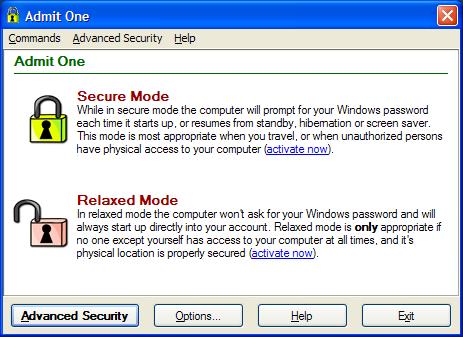
Admit One lets you enable and disable all Windows access password prompts with just one mouse click. Relax security at home - enable full security with one click when on the go or anywhere security is needed. Admit One - don't leave home without it!
In depth
A closer look at Admit One
Admit One lets you enable and disable all Windows password prompts with just one mouse click - You won't be bothered by passwords while at home, and you'll always be prompted to prevent unauthorized use when on the go. Great for desktop PC's as well, where privacy and security are needed. By default Windows asks for your password each time Windows starts up, the computer returns from standby or hibernation, or when screen saver mode is deactivated. This is your first line of defense to prevent outsiders from using your computer if it's left unattended. All the passwords prompts are best left enabled on a laptop computer, for example, when it may be left in a car, hotel room, etc.
Verdict
Should you download Admit One?
Admit One runs on
Windows 10/11
and is available under the
Freeware
license
— the installer is 691 KB.
We’ve catalogued it under
Privacy and Access Control.
✓
Verified clean. Every Admit One build on SoftLookup is scanned for viruses, spyware, adware, trojans and backdoors. We re-test on every update.
Sponsored
At a glance
Admit One specifications
- Last updated
- Mar 12, 2025
- License
- Freeware
- Operating system
- Windows 10/11
- File size
- 691 KB
- Price
- Free
- Page views
- 436
Help fellow users decide. Share your experience with Admit One.