Overview
What is Direct WAV MP3 Splitter?
Direct WAV MP3 Splitter - An MP3 splitter that enables you to further manipulate your audio files by adjusting the play speed, detecting pauses and editing ID3 tags
In depth
A closer look at Direct WAV MP3 Splitter
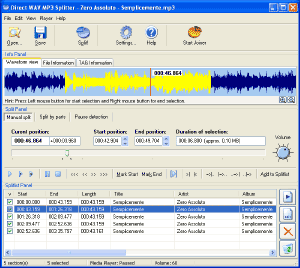
As the title of this application suggests, Direct WAV MP3 Splitter allows you to cut audio tracks with the WAV or MP3 format in a user-friendly environment. The interface of the program is simplistic and easy to navigate through. You can import an audio track by using the file browser only, since the "drag and drop" method is not supported. Batch processing is supported, since you can split multiple parts of the same track at once. So, you can preview the sound file in a built-in media player and split it into equal-sized parts, by play length or size. Plus, you can input overlap values and configure pause detection settings (e.g. level, duration).
Verdict
Should you download Direct WAV MP3 Splitter?
Direct WAV MP3 Splitter runs on
Windows 10/11
and is available under the
Time-limited Trial
license
— the installer is 2.5 MB.
We’ve catalogued it under
Multimedia and Presentation.
✓
Verified clean. Every Direct WAV MP3 Splitter build on SoftLookup is scanned for viruses, spyware, adware, trojans and backdoors. We re-test on every update.
Sponsored
At a glance
Direct WAV MP3 Splitter specifications
- Last updated
- Jan 8, 2025
- License
- Time-limited Trial
- Operating system
- Windows 10/11
- File size
- 2.5 MB
- Price
- $19.95
- Page views
- 678
Help fellow users decide. Share your experience with Direct WAV MP3 Splitter.