Overview
What is Traylook Add-in for Outlook?
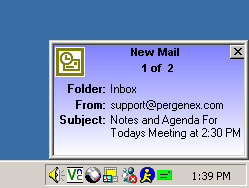
Traylook provides unobtrusive notifications of your arriving email, using a colorful MSN-style popup window. You can quickly glance at the incoming messages as they scroll by one at a time.
In depth
A closer look at Traylook Add-in for Outlook
Traylook runs in the system tray and provides unobtrusive notifications of new email in selected Outlook folders, using a colorful MSN-style popup window. You can quickly glance at the incoming messages as they scroll by one at a time. Read/Delete email directly by clicking links in the notification popup window. The program integrates into Outlook and additional configuration options are available from the Outlook options menu. You can customize the color of the popup window, limit notifications to selected folders, select an alert sound and more.Traylook also lets you hide the Outlook interface and provides quick access to sending new mail, adding tasks etc. from the tray icon menu.
Requirements
System requirements
Outlook 2000/2002/2003, IE 5.5
Verdict
Should you download Traylook Add-in for Outlook?
Traylook Add-in for Outlook runs on
Windows 10/11
and is available under the
Shareware
license
— the installer is 1100 KB.
We’ve catalogued it under
Utilities and Tools.
✓
Verified clean. Every Traylook Add-in for Outlook build on SoftLookup is scanned for viruses, spyware, adware, trojans and backdoors. We re-test on every update.
Sponsored
At a glance
Traylook Add-in for Outlook specifications
- Last updated
- Jan 10, 2025
- Requirements
- Outlook 2000/2002/2003, IE 5.5
- License
- Shareware
- Operating system
- Windows 10/11
- File size
- 1100 KB
- Price
- $9.99
- Page views
- 437
Help fellow users decide. Share your experience with Traylook Add-in for Outlook.