Overview
What is PDF Ripper?
PDF Ripper : Versatile app that allows you to convert PDF to Word, RTF, HTML, and Text, as well as extract images, texts, formula, and other elements from Adobe PDFs
In depth
A closer look at PDF Ripper
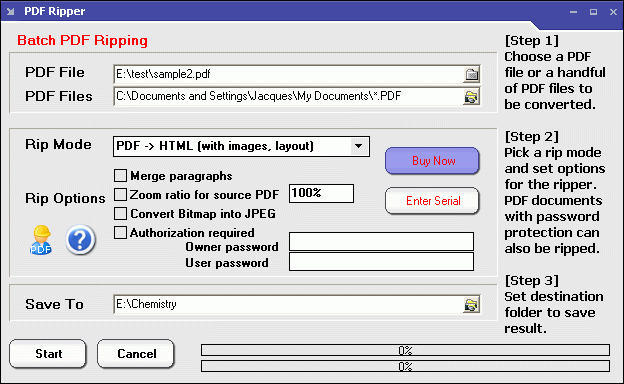
PDF Ripper The interface of the program is very plain and simple to navigate through, since you have limited options at your disposal. You can import PDF documents via the file browser only, since the "drag and drop" method is not supported. Batch processing is allowed.
Requirements
System requirements
Windows 10 64-bit / Windows 10 / Windows Server 2012 / Windows 2008 64-bit / Windows 2008 / Windows 2003 / Windows 8 64-bit / Windows 8 / Windows 7 64-bit / Windows 7 / Windows Vista 64-bit / Windows Vista / Windows XP 64-bit / Windows XP / Windows 2
Verdict
Should you download PDF Ripper?
PDF Ripper runs on
Windows 10/11
and is available under the
Time-limited Trial
license
— the installer is 1 MB.
We’ve catalogued it under
Word Processing.
✓
Verified clean. Every PDF Ripper build on SoftLookup is scanned for viruses, spyware, adware, trojans and backdoors. We re-test on every update.
Sponsored
At a glance
PDF Ripper specifications
- Last updated
- Feb 13, 2025
- Requirements
- Windows 10 64-bit / Windows 10 / Windows Server 2012 / Windows 2008 64-bit / Windows 2008 / Windows 2003 / Windows 8 64-bit / Windows 8 / Windows 7 64-bit / Windows 7 / Windows Vista 64-bit / Windows Vista / Windows XP 64-bit / Windows XP / Windows 2
- License
- Time-limited Trial
- Operating system
- Windows 10/11
- File size
- 1 MB
- Price
- $49
- Page views
- 1111
Help fellow users decide. Share your experience with PDF Ripper.