Overview
What is Graphic Equalizer Studio?
Graphic Equalizer Studio : Analyze WAV files and alter frequency levels with this audio editing application, which also features an integrated compressor and a limiter
In depth
A closer look at Graphic Equalizer Studio
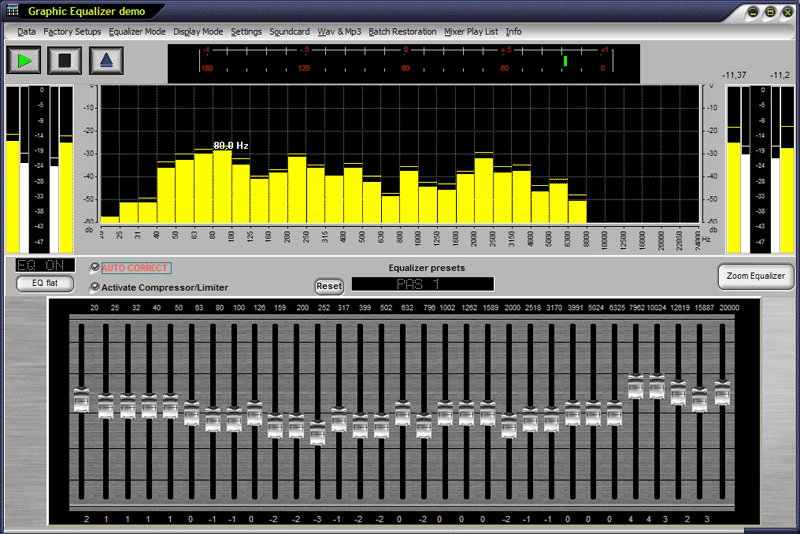
Graphic Equalizer Studio The interface of Graphic Equalizer Studio is quite rough around the edges and the additional Enhancer floating panel alongside its corresponding presets rarely fit in it no matter what size you pick. On the other hand, the emphasis is well considered and chooses the graphical equalizer as its primary target. Graphic Equalizer Studio comes packing a few factory presets for speech level, noise field or subwoofer as well as various equalizer modes like input only, full duplex or WAV and MP3 player. The main feature of this application refers to its capability of making each and every song sound the same and this comes in very handy for radio stations, for example.
Requirements
System requirements
Windows 10 64-bit / Windows 10 / Windows 8 64-bit / Windows 8 / Windows 7 64-bit / Windows 7
Verdict
Should you download Graphic Equalizer Studio?
Graphic Equalizer Studio runs on
Windows 10/11
and is available under the
Not Specified
license
— the installer is 25.7 MB.
We’ve catalogued it under
Audio Encoders.
✓
Verified clean. Every Graphic Equalizer Studio build on SoftLookup is scanned for viruses, spyware, adware, trojans and backdoors. We re-test on every update.
Sponsored
At a glance
Graphic Equalizer Studio specifications
- Last updated
- Jan 12, 2025
- Requirements
- Windows 10 64-bit / Windows 10 / Windows 8 64-bit / Windows 8 / Windows 7 64-bit / Windows 7
- License
- Not Specified
- Operating system
- Windows 10/11
- File size
- 25.7 MB
- Price
- $49
- Page views
- 534
Help fellow users decide. Share your experience with Graphic Equalizer Studio.