Overview
What is Exchange GroupCalendar?
3 clicks, that's all you need for Exchange 2000 or 2003. Exchange GroupCalendar enables anyone who can count to three to install and manage an unlimited number of company shared public calendars.
In depth
A closer look at Exchange GroupCalendar
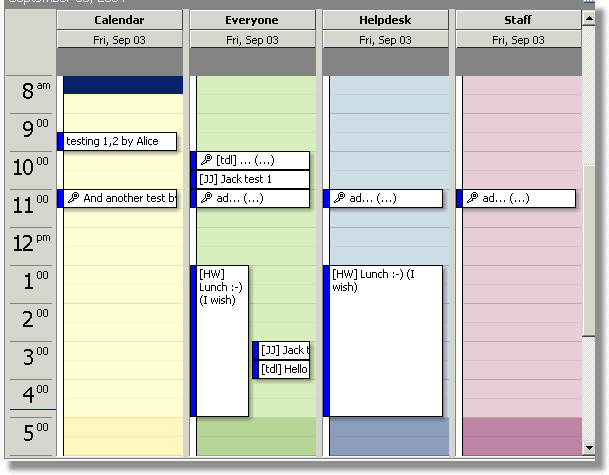
3 clicks, that's all you need to use your sophisticated Exchange 2000 or 2003 server for what it was designed to do: Easy Collaboration. Exchange GroupCalendar enables anyone who can count to three to install and manage an unlimited number of company shared calendars. The perfect tool to help your team collaborate trough Outlook. Either at your desk in the office or at home over the internet.Exchange GroupCalendar integrates with Exchange server and needs no software on the Outlook workstations to give you one, two or twenty Group Calendars. After the '3 step' server configuration your GroupCalendars are ready for use, just one click away for the Outlook users who participate in the GroupCalendars without the need for them to do anything other than what they normally do, keeping their personal schedules up to date. The Exchange Server takes care of updating the GroupCalendars.
Requirements
System requirements
Exchange server 2000 or 2003
Verdict
Should you download Exchange GroupCalendar?
Exchange GroupCalendar runs on
Windows 10/11
and is available under the
Shareware
license
— the installer is 1352 KB.
We’ve catalogued it under
Calendars and Schedulers.
✓
Verified clean. Every Exchange GroupCalendar build on SoftLookup is scanned for viruses, spyware, adware, trojans and backdoors. We re-test on every update.
Sponsored
At a glance
Exchange GroupCalendar specifications
- Last updated
- Jan 10, 2025
- Requirements
- Exchange server 2000 or 2003
- License
- Shareware
- Operating system
- Windows 10/11
- File size
- 1352 KB
- Price
- $1250
- Page views
- 603
Help fellow users decide. Share your experience with Exchange GroupCalendar.