Overview
What is IEHistoryView?
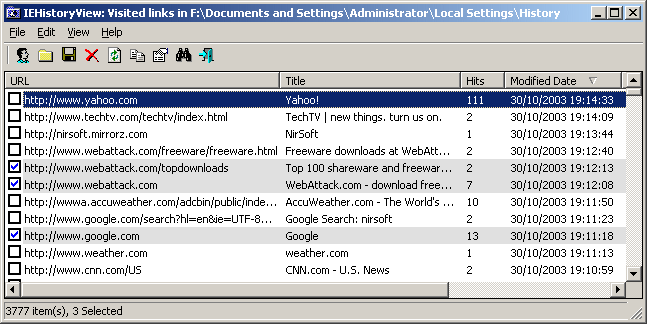
This utility reads all information from the history file created by Internet Explorer, and displays the list of all URLs that you have visited in the last few days.
In depth
A closer look at IEHistoryView
Each time that you type a URL in the address bar or click on a link in Internet Explorer browser, the URL address is automatically added to the history index file. When you type a sequence of characters in the address bar, Internet Explorer automatically suggests you all URLs that begins with characters sequence that you typed (unless AutoComplete feature for Web addresses is turned off). However, Internet Explorer doesn't allow you to view and edit the entire URL list that it stores inside the history file. This utility reads all information from the history file on your computer, and displays the list of all URLs that you have visited in the last few days. It also allows you to select one or more URL addresses, and then remove them from the history file or save them into text, HTML or XML file. In addition, you are allowed to view the visited URL list of other user profiles on your computer, and even access the visited URL list on a remote computer, as long as you have permission to access the history folder.
Verdict
Should you download IEHistoryView?
IEHistoryView runs on
Windows 10/11
and is available under the
Freeware
license
— the installer is 42 KB.
We’ve catalogued it under
Browsing Tools.
✓
Verified clean. Every IEHistoryView build on SoftLookup is scanned for viruses, spyware, adware, trojans and backdoors. We re-test on every update.
Sponsored
At a glance
IEHistoryView specifications
- Last updated
- Feb 15, 2025
- License
- Freeware
- Operating system
- Windows 10/11
- File size
- 42 KB
- Price
- Free
- Page views
- 428
Help fellow users decide. Share your experience with IEHistoryView.