Overview
What is TerminalServiceAgent?
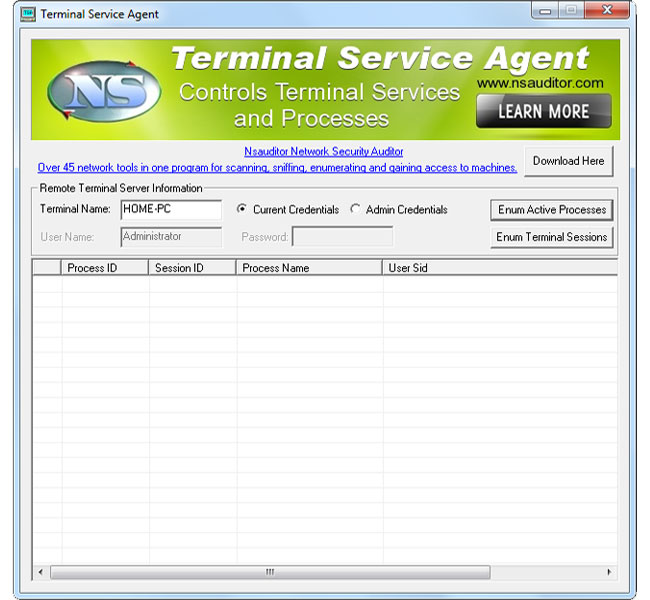
TerminalServiceAgent allows to enumerate and control network terminal services and processes and allows to terminate or log off remotely. The tool is designed with a user-friendly interface and is easy to use.
In depth
A closer look at TerminalServiceAgent
TerminalServiceAgent allows to enumerate and control network terminal services and processes and allows to terminate or log off remotely. TerminalServiceAgent shows remote network terminal service information like Initial Program, Application Name, Working Directory, OEM Id, Session Id, User Name, Windows Station Name, Domain Name, Connect State, Client Build Number, Client Name, Client Directory, Client Product Id, Client Hardware Id, Client Address, Client Display Resolution and Client Protocol Type. The tool is designed with a user-friendly interface and is easy to use.
Requirements
System requirements
Terminal services running on remote computer
Verdict
Should you download TerminalServiceAgent?
TerminalServiceAgent runs on
Windows 10/11
and is available under the
Freeware
license
— the installer is 437 KB.
We’ve catalogued it under
General.
✓
Verified clean. Every TerminalServiceAgent build on SoftLookup is scanned for viruses, spyware, adware, trojans and backdoors. We re-test on every update.
Sponsored
At a glance
TerminalServiceAgent specifications
- Last updated
- Feb 26, 2025
- Requirements
- Terminal services running on remote computer
- License
- Freeware
- Operating system
- Windows 10/11
- File size
- 437 KB
- Price
- Free
- Page views
- 426
Help fellow users decide. Share your experience with TerminalServiceAgent.