Overview
What is R2V?
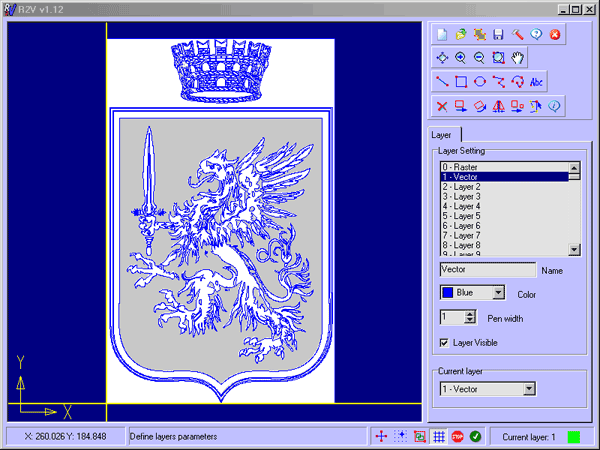
R2V convert raster images to vector by drawing centerlines and outlines. A vector format can be imported to your CAD/CAM or drawing program. R2V supports the Bmp and Jpeg raster format. The output vector files can be saved in DXF, HPGL, TXT format.
In depth
A closer look at R2V
R2V is a tool for converting raster images to vector by drawing centerlines and outlines. R2V converts architect, mechanical and various technical drawings, maps and other types from raster to vector format. A vector format can be imported into your CAD/CAM or drawing program. R2V supports the Bmp and Jpeg raster format. The output vector file can be saved in DXF (Autocad), HGL (HPGL) and TXT (ASCII XY) format. R2V allows to manipulate vector (Scale, Rotate, Mirror, Move) and create simple cad drawing with Line, Rectangle, Arc/Ellipse, Polyline and Spline. R2V also converts any True Type font into vector. R2V can use up to 256 layers. The following properties can be applied to each layer: color, pen width, visible.
Requirements
System requirements
Pentium/Amd >300 MHz, True color Video Card (24-bit) - 800 x 600
Verdict
Should you download R2V?
R2V runs on
Windows 10/11
and is available under the
Shareware
license
— the installer is 1602 KB.
We’ve catalogued it under
AutoCAD Utilities.
✓
Verified clean. Every R2V build on SoftLookup is scanned for viruses, spyware, adware, trojans and backdoors. We re-test on every update.
Sponsored
At a glance
R2V specifications
- Last updated
- Jan 8, 2025
- Requirements
- Pentium/Amd >300 MHz, True color Video Card (24-bit) - 800 x 600
- License
- Shareware
- Operating system
- Windows 10/11
- File size
- 1602 KB
- Price
- $42
- Page views
- 666
Help fellow users decide. Share your experience with R2V.