Overview
What is Bmp2Cnc?
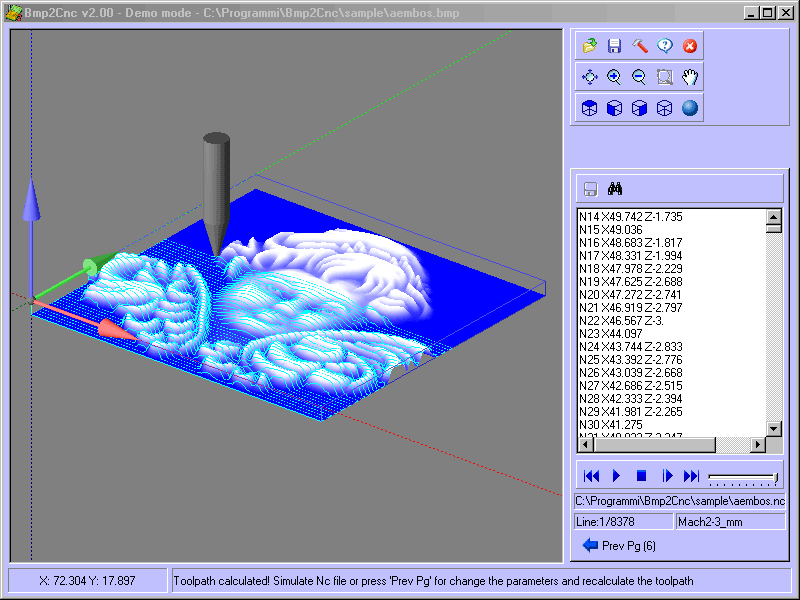
Bmp2Cnc converts Bmp or Jpg digital image files into 3d G-Code. Creates ISO toolpaths for most of CNC machines tool. Works with flat, spherical and conical tools. Postprocessor for many CNC controller is included.
In depth
A closer look at Bmp2Cnc
Bmp2Cnc reads the file in bitmap format (Jpg or BMP with 32,24,16,8 or 1 bit/plane color). Color or grayscale is quantified to adjust Z-axis depth, different tool overlaps, depths and tool radius are permitted. Final sizes of X-Y output can be scaled and stored into CNC files that could run with most computer numerical control routers and mills. Bmp2Cnc uses the different layers or shades to produce the depth of cut or Z-axis, as well as scaling the X-Y coordinates to the desired carving size. Bmp2Cnc manages flat, spherical and conical tools. Bmp2Cnc also create an .STL file for 3d preview and for use in other CAD/CAM applications. Bmp2Cnc provides a default set of Postprocessor available with the product installation. It is possible to quickly and easily create new Postprocessors or modify existing ones.
Requirements
System requirements
Pentium/Amd >300 MHz, True color Video Card (24-bit) - 800 x 600
Verdict
Should you download Bmp2Cnc?
Bmp2Cnc runs on
Windows 10/11
and is available under the
Shareware
license
— the installer is 2908 KB.
We’ve catalogued it under
AutoCAD Utilities.
✓
Verified clean. Every Bmp2Cnc build on SoftLookup is scanned for viruses, spyware, adware, trojans and backdoors. We re-test on every update.
Sponsored
At a glance
Bmp2Cnc specifications
- Last updated
- Mar 1, 2025
- Requirements
- Pentium/Amd >300 MHz, True color Video Card (24-bit) - 800 x 600
- License
- Shareware
- Operating system
- Windows 10/11
- File size
- 2908 KB
- Price
- $45
- Page views
- 624
Help fellow users decide. Share your experience with Bmp2Cnc.