Overview
What is Morpheus Photo Compressor?
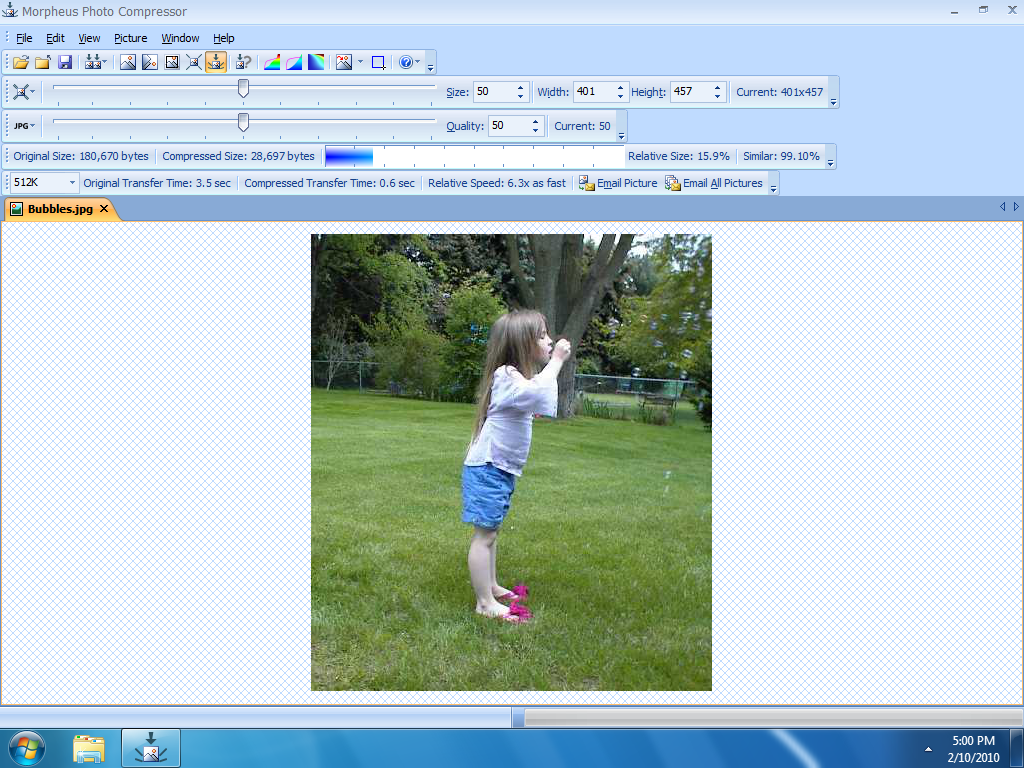
Put an end to returned emails and slow-loading websites! With Morpheus Photo Compressor, optimizing your favorite images is as simple as adjusting two sliders — one for size and one for quality.
In depth
A closer look at Morpheus Photo Compressor
Put an end to returned emails and slow-loading websites! With Morpheus Photo Compressor, optimizing your favorite images is as simple as adjusting two sliders — one for size and one for quality. You'll instantly see what the image will look like with those settings, how big the file will be, and how long it would take to download or email. You can even send the picture directly to a new email without having to save it.
Requirements
System requirements
500MHz or faster, 256M of RAM or more, 800x600 pixels or higher
Verdict
Should you download Morpheus Photo Compressor?
Morpheus Photo Compressor runs on
Windows 10/11
and is available under the
Shareware
license
— the installer is 1712 KB.
We’ve catalogued it under
Graphics Editing and Painting.
✓
Verified clean. Every Morpheus Photo Compressor build on SoftLookup is scanned for viruses, spyware, adware, trojans and backdoors. We re-test on every update.
Sponsored
At a glance
Morpheus Photo Compressor specifications
- Last updated
- Mar 12, 2025
- Requirements
- 500MHz or faster, 256M of RAM or more, 800x600 pixels or higher
- License
- Shareware
- Operating system
- Windows 10/11
- File size
- 1712 KB
- Price
- $19.95
- Page views
- 630
Help fellow users decide. Share your experience with Morpheus Photo Compressor.