Overview
What is Send Personally?
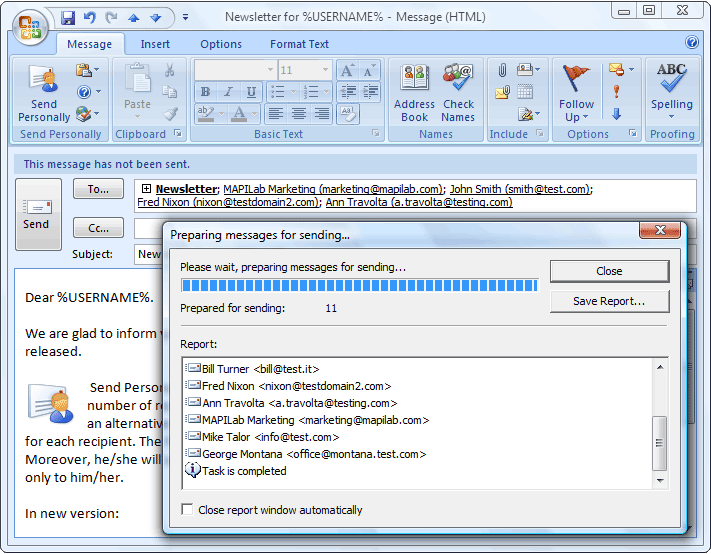
Add-in offers an alternative method of sending messages from Microsoft Outlook 2000-2003, separate message being created for each recipient. The final recipient will see only his/her name and address in the "To" field.
In depth
A closer look at Send Personally
Add-in Send Personally (SPE) is designed to send messages to a great number of recipients via Microsoft Outlook 2000-2003. Add-in offers an alternative method of sending messages from Outlook, separate message being created for each recipient. The final recipient will get no information about the other recipients. Moreover, he/she will see only his/her name and address in the "To" field, as if the message was sent only to him/her. The main problem with sending messages through Outlook is that Outlook shows all the recipients in the message heading. If the recipient list is relatively small, this doesn't result in any considerable inconvenience. However, if a message is sent to hundreds of recipients, its heading size might many times exceed the size of the message text and all attachments thereto. Send Personally offers an easy solution for the problem. And you won't need to perform any additional actions. The only thing you will have to do is to press the button "Send Personally" instead of the standard "Send" button (you will find it next to the latter). With Send Personally, no special setup procedures are needed: it is ready to use right upon installation. Additional features: 1. You can use macros (special expressions automatically replaced by recipient's personal data when sending a message) in message text. Using the macros, you can insert recipient's name, e-mail address, as well as the name of Outlook distribution list containing his/her address at the moment of sending, into a message. 2. When creating a message, you can choose addresses to be excluded from the distribution list. To do that, simply create a new Outlook distribution list which name starts with the word "exclude", add the addresses to be excluded into that list, and enter the list name along with the others into the "To" field of the message being created.
Requirements
System requirements
Microsoft Outlook 2000/XP/2003 or later
Verdict
Should you download Send Personally?
Send Personally runs on
Windows 10/11
and is available under the
Shareware
license
— the installer is 1804 KB.
We’ve catalogued it under
E-Mail Tools.
✓
Verified clean. Every Send Personally build on SoftLookup is scanned for viruses, spyware, adware, trojans and backdoors. We re-test on every update.
Sponsored
At a glance
Send Personally specifications
- Last updated
- Apr 25, 2026
- Requirements
- Microsoft Outlook 2000/XP/2003 or later
- License
- Shareware
- Operating system
- Windows 10/11
- File size
- 1804 KB
- Price
- $24
- Page views
- 463
Help fellow users decide. Share your experience with Send Personally.