Overview
What is Linspect Editor?
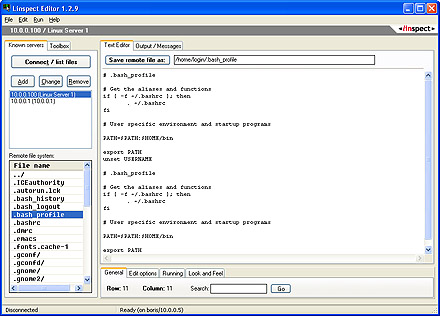
Linspect Editor is a freeware text editor for Windows. It allows you to open files from remote Linux or Unix servers over an SSH-secured connection, change/update the files and write it back to the server. Very easy to setup and use.
In depth
A closer look at Linspect Editor
Linspect Editor is a freeware text editor for Windows. It allows you to open files from remote Linux or Unix servers over an SSH-secured connection, change/update the files and write it back to the server. Linspect Editor is a must for system administrators and programmers who often need to edit server-side configuration files, system scripts, batch files, source code, CGI scripts and common text files residing on remote Linux/Unix servers. Before the Linspect Editor was around, usual way of editing remote files was to login to a Unix/Linux machine and edit the file using a text editor (e.g. vi). If you wanted to transfer a text file (e.g. a CGI or a system script) to a different machine, you needed to use various file transfer utilies (many of them being insecure). Now that the Linspect Editor is here, you need nothing else. Just run it, connect to a server, browse through the server file system, open a file (file is downloaded to Linspect Editor over SSH), change the file and save it either locally, or back to the server (or to any other server). You can also open/edit/save local files, and save them to remote servers as well. Linspect Editor does Unix<->Windows CR/LF format conversion for you. With Linspect Editor you can e.g. connect to a Linux machine (using a secure SSH1 or SSH2 connection), browse through the server file system, open a script (the script will open in Linspect Editor on your Windows machine and the connection to the server is closed), then you can edit the file, connect to a different Linux/Unix machine, browse to a desired directory and save the script there. Linspect Editor does not keep the connection open. It connects to a server just if you are opening or saving a remote file. You can also save files locally (on your Windows machine). Linspect Editor is the easiest and the fastest way of editing server-side text files on your Windows machine.
Verdict
Should you download Linspect Editor?
Linspect Editor runs on
Windows 10/11
and is available under the
Freeware
license
— the installer is 500 KB.
We’ve catalogued it under
Utilities and Tools.
✓
Verified clean. Every Linspect Editor build on SoftLookup is scanned for viruses, spyware, adware, trojans and backdoors. We re-test on every update.
Sponsored
At a glance
Linspect Editor specifications
- Last updated
- Mar 12, 2025
- License
- Freeware
- Operating system
- Windows 10/11
- File size
- 500 KB
- Price
- Free
- Page views
- 459
Help fellow users decide. Share your experience with Linspect Editor.