Overview
What is Linspect Commander?
Linspect Commander is a software utility for Windows. It allows you to execute commands on remote Linux or Unix servers over an SSH-secured connection without logging in and running the commands manually.
In depth
A closer look at Linspect Commander
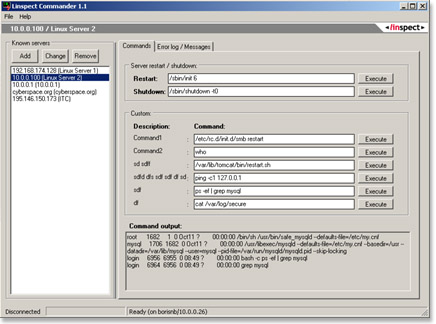
Linspect Commander is a software utility for Windows. It allows you to execute commands on remote Linux or Unix servers over an SSH-secured connection without logging in and running the commands manually. Linspect Commander can be useful for system administrators and programmers who often need to restart various server-side components (servers, daemons or other running programs) in order to do the development/debugging. It comes really handy even if you are setting up a Linux/Unix system and need to restart e.g. Samba, Tomcat, or the whole server to apply the new configuration. Using Linspect Commander you can set up commands you use most frequently and run them just by choosing a server from the list and clicking a desired command button. Upon executing a command you will also see the output it produces in the console window. This way you can easily find out e.g. what is the current status of a running server system (who is logged in, what is in the access log etc.). You can also customize each command and save your preferences for future use. Linspect Commander does not keep the connection open. It connects to a server just when you execute a command. It waits for the output (or for a timeout of 15 seconds) and disconnects from the server. Linspect Commander allows you to execute commands on remote Linux/Unix systems by clicking buttons on your Windows desktop. It is secure and easy to use.
Verdict
Should you download Linspect Commander?
Linspect Commander runs on
Windows 10/11
and is available under the
Freeware
license
— the installer is 500 KB.
We’ve catalogued it under
Utilities and Tools.
✓
Verified clean. Every Linspect Commander build on SoftLookup is scanned for viruses, spyware, adware, trojans and backdoors. We re-test on every update.
Sponsored
At a glance
Linspect Commander specifications
- Last updated
- Jan 5, 2025
- License
- Freeware
- Operating system
- Windows 10/11
- File size
- 500 KB
- Price
- Free
- Page views
- 490
Help fellow users decide. Share your experience with Linspect Commander.