Overview
What is Turbo Searcher?
The fastest file search utility in the world for finding your any type of files through your local or network computers instantly, supports searching within compressed archives and duplicate files on your system.
In depth
A closer look at Turbo Searcher
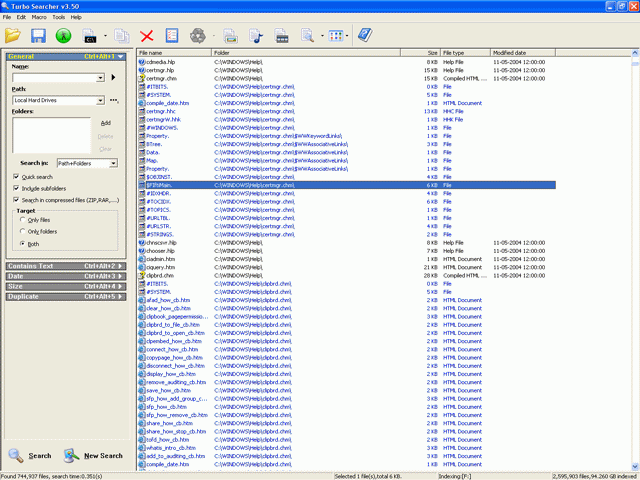
Turbo Searcher is the fastest tool in the world for finding any type of files through your local or network computers. All you need to do is typing in your search words and press ENTER, mostly the search time is within 1 second. With Turbo Searcher you can find any type of file through file names, folders, date, size, etc, For searching image, music and video files, all you have to do is click one button, it also supports One Click Searching for user specified file type, such as mp3,jpg,doc,etc. It provides a powerful engine for searching ASCII strings, UNICODE strings and HEX codes in files and support searching within PDF files, and provides a script engine for unlimited Relative Operations such as XOR,AND,OR,NOT,etc. Turbo Searcher supports searching in compressed archives, such as ZIP,RAR,CAB,etc.It will show an Introductory Texts when searching within files. Turbo Searcher supports searching duplicate files on your system and provides 6 different compare levels for different purpose, and has features for printing your nice search results on your papers. You can start Turbo Searcher from Windows Explorer. It is a complete replacement tool for Windows File Search Utility.
Verdict
Should you download Turbo Searcher?
Turbo Searcher runs on
Windows 10/11
and is available under the
Shareware
license
— the installer is 1987 KB.
We’ve catalogued it under
Utilities and Tools.
✓
Verified clean. Every Turbo Searcher build on SoftLookup is scanned for viruses, spyware, adware, trojans and backdoors. We re-test on every update.
Sponsored
At a glance
Turbo Searcher specifications
- Last updated
- Jan 7, 2025
- License
- Shareware
- Operating system
- Windows 10/11
- File size
- 1987 KB
- Price
- $29.95
- Page views
- 466
Help fellow users decide. Share your experience with Turbo Searcher.