Overview
What is Logon Automator?
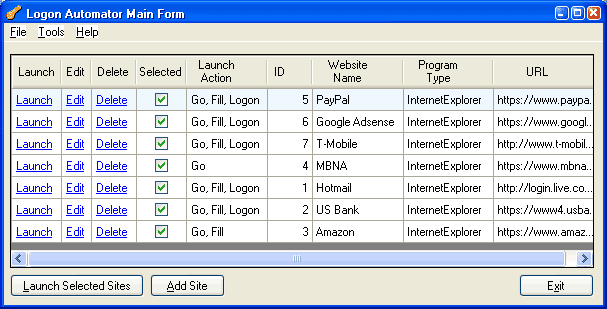
Automatically logs on to multiple web sites simultaneously with a click of a button. All you need to remember is the master password to log on to Logon Automator. It will remember all your user names and passwords, and log on for you.
In depth
A closer look at Logon Automator
Each time you sign up for a new account online, don’t you wish you had a way to securely store the user name and password, and automatically retrieve them when you visit the site in the future? You don’t want to have to write down the logon information for all your web-based e-mail accounts, credit card accounts, bank accounts, utilities accounts, stock trading accounts, etc. on a piece of paper because you might misplace it. And you don’t want to save them to a text file on your computer because the file might be viewed by someone who has access to your computer. Wouldn’t it be nice to be able to encrypt the sensitive logon information and retrieve it with a mouse click? Better yet, how about logging on to multiple web sites simultaneously without having to remember your user name and password? Logon Automator does all of the above and more:
Requirements
System requirements
.Net Framework 2.0
Verdict
Should you download Logon Automator?
Logon Automator runs on
Windows 10/11
and is available under the
Shareware
license
— the installer is 954 KB.
We’ve catalogued it under
Privacy and Access Control.
✓
Verified clean. Every Logon Automator build on SoftLookup is scanned for viruses, spyware, adware, trojans and backdoors. We re-test on every update.
Sponsored
At a glance
Logon Automator specifications
- Last updated
- Apr 28, 2026
- Requirements
- .Net Framework 2.0
- License
- Shareware
- Operating system
- Windows 10/11
- File size
- 954 KB
- Price
- $30
- Page views
- 415
Help fellow users decide. Share your experience with Logon Automator.