Overview
What is ReplyButler?
Do get lots of e-mail? You need ReplyButler! Your personal Butler prewrites the addressing in the mails, administrates your text modules and sorts your e-mails into folders. Try it now!
In depth
A closer look at ReplyButler
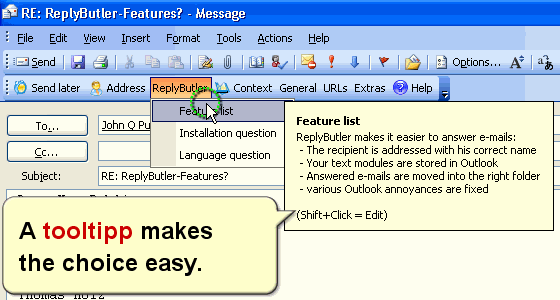
How often did you type "Dear Mrs. ..." and added a few words that were almost always the same? Why bother with such repetitive task? We don't and you shouldn't either That’s why we created the ReplyButler, an add-on for Microsoft Oulook that saves you from a lot of boring typing (and typos). Directly after the first click on the Outlook-Button "Reply" it gets clear how convenient this is. ReplyButler automatically detect the name, the language and the style of the mail and generates a matching answer. It's astonishing how reliable the program does this and creates a perfect answer. (Depending on the situation with his first or last name and of course with a matching greeting phrase.) The next feature is great for everybody who uses Microsoft Outlook at work. Especially here you often have very similar situations that require the same e-mails (e.g. "thank you for you inquiry..."). You can store these textmodules in ReplyButler which makes it very easy to organize them and later use them in other e-mails.
Requirements
System requirements
Microsoft Outlook 2000 or better
Verdict
Should you download ReplyButler?
ReplyButler runs on
Windows 10/11
and is available under the
Freeware
license
— the installer is 1770 KB.
We’ve catalogued it under
Help and Support.
✓
Verified clean. Every ReplyButler build on SoftLookup is scanned for viruses, spyware, adware, trojans and backdoors. We re-test on every update.
Sponsored
At a glance
ReplyButler specifications
- Last updated
- Feb 14, 2025
- Requirements
- Microsoft Outlook 2000 or better
- License
- Freeware
- Operating system
- Windows 10/11
- File size
- 1770 KB
- Price
- Free
- Page views
- 639
Help fellow users decide. Share your experience with ReplyButler.