Overview
What is Multimedia Manager?
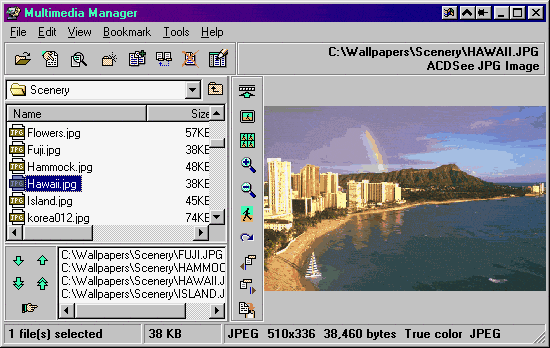
Multimedia Manager is an all-in-one multimedia software that lets you view, play and manage your multimedia files in style. Supports many popular formats: BMP, JPG, GIF, PNG, TIF, TGA, PCX, PCD, PSD, WPG, WMF, MP3, MID, AVI, etc.
In depth
A closer look at Multimedia Manager
Multimedia Manager is an all-in-one multimedia software that lets you view, play and manage your multimedia files in style. Supports many popular graphics and multimedia formats such as BMP, JPG, GIF, PNG, TIF, TGA, PCX, PCD, PSD, ICO, WPG, WMF, MP3, MID, WAV, RMI, AVI, MOV, ANI, etc. Incorporated with fast and high quality image decoding/encoding engine, you can stretch, tile, flip, rotate, resize, zoom, or print any image easily.Some other features are drag'n drop support, clipboard support, powerful files management capability, list box feature, wallpaper support, full ZIP support, batch image conversion, advanced slide show feature, image manipulation support (blur, mosaic, oil paint, spray, sharpen, soften, wave, half tone, and much more...), and many other cool and unique features.
Requirements
System requirements
32 MB RAM, 5 MB HD
Verdict
Should you download Multimedia Manager?
Multimedia Manager runs on
Windows 95/98/Me/NT/2000/Windows 10/11
and is available under the
Shareware
license
— the installer is 1906 KB.
We’ve catalogued it under
Graphics Viewing.
✓
Verified clean. Every Multimedia Manager build on SoftLookup is scanned for viruses, spyware, adware, trojans and backdoors. We re-test on every update.
Sponsored
At a glance
Multimedia Manager specifications
- Last updated
- Mar 12, 2025
- Requirements
- 32 MB RAM, 5 MB HD
- License
- Shareware
- Operating system
- Windows 95/98/Me/NT/2000/Windows 10/11
- File size
- 1906 KB
- Price
- $24.95
- Page views
- 588
Help fellow users decide. Share your experience with Multimedia Manager.