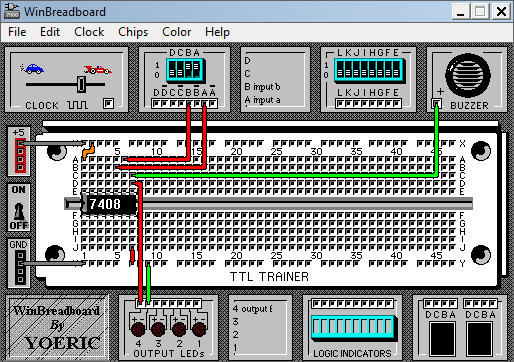
WinBreadboard is a digital electronics breadboarding simulator.
WinBreadboard is designed to work like the real hardware trainers used in many digital circuits courses. Unlike other simulators which use a schematic-based approach to describe circuits, WinBreadboard uses a unique metaphor (computer representation of a real world object) in which users manipulate chips and wires, not individual gates. This interaction provides users with a more realistic understanding of how electronic components are actually used.
WinBreadboard may be used as a supplement to digital circuits course work. It can also be used in situations where digital trainers are not available. WinBreadboard features an intuitive and user friendly interface and provides you with access to a wide collection of circuit template.
A breadboard is a platform you can use to build and test electronic circuits, usually without having to do any soldering. Certain parts of the breadboard are wired together so that electricity can flow from component to component in orderly rows. Amateurs and experts alike use them to experiment with circuit ideas, and in some cases, they can be used to build useful devices directly on the breadboard.
Breadboard Function and Uses
A breadboard is an inexpensive, easy-to-use piece of hardware for wiring electrical circuits. Breadboards acquired their name because they are similar in shape to cutting boards used for cutting unsliced bread. In the past, hobbyists and engineers nailed metal spikes into cutting boards when wiring circuits.
A breadboard is usually covered with holes lined with metal, in which wires and electrical components such as resistors, diodes and capacitors can be plugged. The holes are divided into rows, and holes within particular rows are wired together on the underside of the breadboard so that an electric current can flow down the rows.
Virtual Breadboards
If you don't have a breadboard or don't have the electrical components that you need, you can use a virtual breadboard program that allows you to build and test simulated circuits on a computer or smart phone. Some programs for this purpose include Fritzing and CircuitLab.
WinBreadboard runs on
Windows 10/11
and is available under the
Shareware
license
— the installer is 507 KB.
We’ve catalogued it under
Science and Engineering.
✓
Verified clean. Every WinBreadboard build on SoftLookup is scanned for viruses, spyware, adware, trojans and backdoors. We re-test on every update.
Help fellow users decide. Share your experience with WinBreadboard.